
🔒 Login Guide

Tic Tac Bets Login Guide
Desktop | Mobile | Android App | Password Reset
Sign in with your email or mobile number. Access sports, slots, and live casino in seconds.

⚡ Quick Facts
Login Username
Phone or Email
Licence
NCGB
Android App
APK Download
Welcome Bonus
R5,000 + 75 Spins
Min Deposit
R5
iOS App
Mobile Browser
📋 Table of Contents
To log in to your Tic Tac Bets account, go to tictacbets.co.za, tap the “Login” button in the top-right corner, enter your email address or SA mobile number and password, then tap “Sign In.” The process takes under 10 seconds and works the same on desktop, mobile browser, and the Android app.
If you have not registered yet, you will need to create an account first. Our full Tic Tac Bets review covers the complete registration process, which takes under 5 minutes using SMS verification. Once registered, come back here for the fastest way to sign in and troubleshoot any issues.
🔒 How to Log In to Tic Tac Bets
TicTacBets lets you sign in using either your SA cellphone number or the email address you provided during registration. Your password is the same regardless of which option you use. Follow these three steps to access your account on any device.
Step 1: Go to the Tic Tac Bets Website
Open any browser on your computer, phone, or tablet and navigate to tictacbets.co.za. Confirm you are on the official site by checking for the padlock icon in the address bar. Bookmark the page to avoid mistyping the URL in future.
Step 2: Open the Login Form
Tap or click the “Login” button in the top-right corner of the homepage. A login popup will appear with fields for your email or phone number and password.
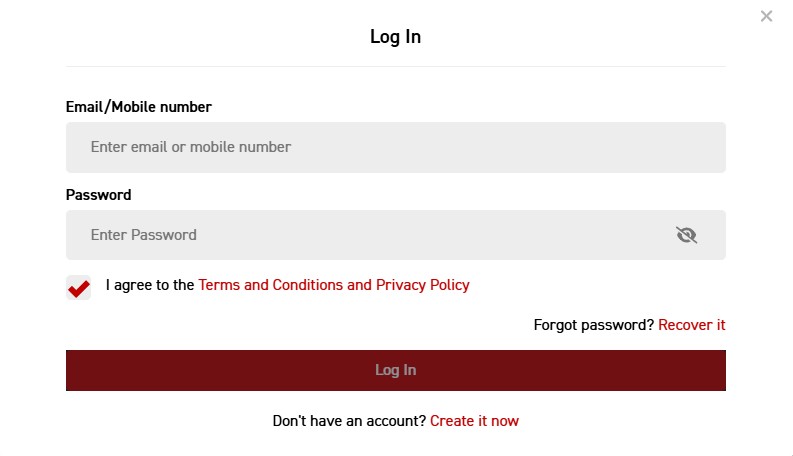
Step 3: Enter Your Credentials and Sign In
Email or phone number: Enter the email address or SA cellphone number you registered with (e.g. name@email.com or 0821234567). Password: Type the password you created during registration. Tap “Sign In” and you will be redirected to your account dashboard where you can deposit, place bets on 30+ sports, play 600+ casino games, or manage your profile.
✅ Two Ways to Sign In
Tic Tac Bets accepts either your registered email address or your SA mobile number as your username. Use whichever is easier to remember. If you have changed your phone number or email since registering and can no longer access either, contact support at support@tictacbets.co.za to update your details.
📱 Mobile and App Login
📱 Mobile Browser Login
The Tic Tac Bets mobile login is identical to the desktop process. Open Chrome, Safari, or any mobile browser, go to tictacbets.co.za, tap “Login” in the top-right corner, enter your email or phone number and password, and tap “Sign In.” The mobile site is fully optimised and loads quickly on 3G and 4G connections.
For quicker access, you can add TicTacBets to your phone’s home screen or install the Android app. Our Tic Tac Bets app download guide covers both options with step-by-step instructions for Android and iPhone.
📲 Android App Login
If you have the Tic Tac Bets Android app installed, open it and you will see the same login form on the home screen. Enter your email or mobile number and password, then tap “Sign In.” The app saves your session, so you typically stay logged in between uses unless you manually sign out or the session expires after extended inactivity.
If you have not installed the app yet, our Tic Tac Bets app download guide walks through the full APK download and installation process for Android, plus the mobile browser alternative for iPhone users.
📲 App Login Quick Checklist
- Open the app and wait for the home screen to load
- Tap “Login” if you are not already signed in
- Enter your email or mobile number (the one you used at registration)
- Enter your password and tap “Sign In”
No app installed? See our app download guide for the full Android APK install and iOS mobile browser alternative.
🔑 Forgot Your Password? How to Reset It
If you have forgotten your TicTacBets password, the reset process takes under two minutes. You will need access to either the mobile number or the email address linked to your account.
Step 1: Open the Login Form
Go to tictacbets.co.za and tap the “Login” button. On the login popup, look for the “Forgot Password” link below the password field.
Step 2: Enter Your Registered Phone Number or Email
Type the SA cellphone number or email address linked to your account. This must match exactly what you used during registration. Tic Tac Bets will send a verification code via SMS or a reset link to your email.
Step 3: Enter the SMS Code and Create a New Password
Enter the verification code received via SMS. Choose a new password that is at least 8 characters long with a mix of letters and numbers. Confirm the new password and tap “Submit.” You can now sign in with your updated credentials.
⚠️ Lost Access to Both Your Phone and Email?
If you no longer have access to your registered mobile number or email address, the self-service reset will not work. Contact Tic Tac Bets support directly via 24/7 live chat or email at support@tictacbets.co.za. Have your full name, SA ID number, and any deposit receipts ready so they can locate your account and update your details.
⚠️ Common Login Problems and Fixes
Having trouble signing in to your Tic Tac Bets account? Here are the most common issues SA players run into, along with tested solutions.
| Problem | Cause | Fix |
|---|---|---|
| “Invalid credentials” | Wrong phone number/email format or typo in password | If using your phone number, enter it without the country code (e.g. 0821234567, not +27821234567). If using email, check for typos. Confirm caps lock is off. Reset password if unsure. |
| SMS code not arriving | Network delay or full SMS inbox | Wait 2-3 minutes. Delete old messages to free inbox space. Try “Resend Code” if available. Contact support if it still fails after 10 minutes. |
| Account locked | Too many failed login attempts | Wait 30 minutes for the lockout to expire. If still locked, email support@tictacbets.co.za with your registered name and phone number. |
| Page not loading | Browser cache or connectivity issue | Clear your browser cache and cookies, or try an incognito/private window. Switch from Wi-Fi to mobile data (or vice versa) to rule out network issues. |
| “Account not found” | Unregistered number or account not fully created | Confirm you completed the full registration process, including SMS verification. If you abandoned registration midway, you may need to register again. |
| App login failing | Outdated app version | Reinstall the latest version from tictacbets.co.za. See our app guide for full troubleshooting steps. |
If none of the above fixes resolve your issue, contact Tic Tac Bets support via live chat on the website or email at support@tictacbets.co.za. Support is available 24/7 via live chat. For general platform information including games, bonuses, and payment methods, see our Tic Tac Bets promo codes and bonuses guide.
🛡️ Keep Your Tic Tac Bets Account Secure
Tic Tac Bets is licensed by the Northern Cape Gambling Board and operated by Vengies Gaming (Pty) Ltd (Company Reg: 2012/050393/07). The platform uses SSL encryption for all data transmission. That said, account security is a shared responsibility. Follow these practices to protect your Tic Tac Bets login.
🛡️ Security Best Practices
- Use a unique password: Do not reuse your TicTacBets password on other sites. Make it at least 8 characters with a mix of uppercase, lowercase, and numbers.
- Never share your credentials: Tic Tac Bets staff will never ask for your password via email, phone, or chat. Any such request is a scam.
- Bookmark the official URL: Access tictacbets.co.za directly from your bookmark or by typing it manually. Avoid clicking login links in emails or social media messages.
- Complete FICA verification: This protects your account against unauthorized withdrawals. You will need your SA ID and proof of address. Details are available in our FICA verification guide.
- Log out on shared devices: If you access your account from a public computer, library, or someone else’s phone, always sign out when finished.
Tip: If you suspect unauthorized access to your account, change your password immediately and contact support@tictacbets.co.za. They can review recent activity and secure your account.
🎰 What You Can Do After Logging In
Once signed in, your Tic Tac Bets dashboard gives you full access to the platform. Here is a quick overview of where to find key features.
| Feature | Where to Find It |
|---|---|
| Deposit funds | My Account → Deposit (EFT, Ozow, Voucher) |
| Withdraw winnings | My Account → Withdraw (FICA required first) |
| Claim bonuses | Promotions tab or contact support for free spins |
| Sports betting | Sports tab (30+ markets including soccer, rugby, cricket, horse racing) |
| Slots and casino | Casino tab (600+ games from Pragmatic Play, NetEnt, Red Tiger, AGT) |
| FICA upload | My Account → Verification, or send documents via live chat |
| Change password | My Account → Settings → Password |
New to Tic Tac Bets? After your first login, claim 25 free spins on Gates of Olympus (credited automatically on registration, no deposit needed). Then deposit as little as R5 to unlock the 100% match up to R5,000 sports bonus plus 50 additional free spins. Full bonus details, wagering calculations, and cashback offers are covered in our Tic Tac Bets promo codes and bonuses guide.

❓ Frequently Asked Questions
What is my Tic Tac Bets username?
Your username is either the SA mobile number or the email address you registered with. You can use either one on the login form. If you cannot remember which details you used, contact support at support@tictacbets.co.za with your full name and ID number to retrieve your account details.
Can I log in from multiple devices at the same time?
You can access your account from any device using the same credentials. However, logging in on a new device may sign you out of the previous one. Your balance, bets, and bonuses sync across all devices in real time.
Is there a Tic Tac Bets iOS app?
Not currently. iPhone and iPad users should use the mobile website at tictacbets.co.za, which works well on Safari. Our app download guide covers the home screen shortcut for iPhone and the Android APK install process.
How do I reset my Tic Tac Bets password without access to my phone or email?
If you have lost access to both your registered phone number and email address, the self-service password reset will not work. Email support@tictacbets.co.za from any email address, or use the 24/7 live chat. Be ready to provide your full name, SA ID number, and any previous deposit receipts so support can verify your identity and update your account details.
Is TicTacBets safe to log in to?
Yes. Tic Tac Bets is licensed by the Northern Cape Gambling Board, operated by Vengies Gaming (Pty) Ltd with a company registration dating back to 2012, and uses SSL encryption for all connections. The platform passed all 15 scam indicator tests in our review. Always access the site through tictacbets.co.za directly, not through links in unsolicited messages.
Do I need to complete FICA to log in?
No, FICA is not required for login. You can sign in, deposit, and play without completing FICA verification. However, you will need to submit your documents (SA ID + proof of address) before making any withdrawals. We recommend completing FICA immediately after your first login to avoid delays when you want to cash out.
Ready to Play at Tic Tac Bets?
✅ NCGB Licensed | ✅ R5,000 Bonus + 75 Free Spins | ✅ R5 Min Deposit | ✅ 600+ Games
📚 Related Resources
- Tic Tac Bets Registration Guide – Create your account and claim 25 free spins
- Tic Tac Bets App Download Guide – Android APK install and iOS home screen shortcut
- Tic Tac Bets Casino Review – Full platform overview with games, sports, and payments
- Tic Tac Bets Promo Codes and Bonuses – No code needed, full bonus terms and wagering breakdown
- No Deposit Bonuses South Africa – Compare free bonus offers across all licensed SA casinos
18+ Only. Tic Tac Bets is licensed by the Northern Cape Gambling Board. Gambling can be addictive and harmful if not controlled. Winners know when to stop. For help, contact South African Responsible Gambling Foundation: 0800 006 008 or WhatsApp 076 675 0710.
Disclaimer: This guide was last updated March 2026. Login processes and features may change. Always verify current details on the official Tic Tac Bets website. Gambling involves risk.
Affiliate Disclosure: iBets.co.za may receive commission through affiliate links, but this does not influence our independent reviews and analysis.
Licensing: Vengies Gaming (Pty) Ltd (Reg: 2012/050393/07). Licensed by the Northern Cape Gambling Board. 18+. Winners know when to stop.