
📱 South African Mobile Betting Guide

FirstBet App Download Guide: Install on iOS, Android APK, or Huawei AppGallery in Minutes
iOS App Store | Android APK | Huawei AppGallery | Push Notifications | Fast Deposits
Native apps for every major SA device, with local markets, local support, and SA-licensed betting
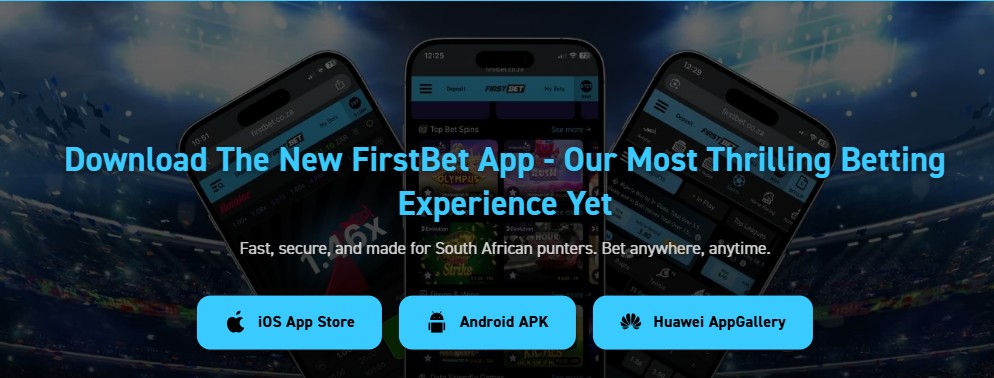
⚡ FirstBet App Quick Facts
iOS
Apple App Store
Android
APK Download
Huawei
AppGallery
Push Notifications
Yes
Cost
Free
In-App Deposits
EFT, Card, Vouchers
📋 Table of Contents ▼
FirstBet ships native apps for all three major South African mobile platforms: iOS via the Apple App Store, Android via direct APK download from firstbet.co.za, and Huawei via the official AppGallery. All three are free, all three carry the same FirstBet account login (one set of credentials works across every device), and all three offer the full betting experience: sports, horse racing, lucky numbers, casino, crash games, and live dealer titles. The download page sits in the FirstBet menu, where you tap whichever button matches your phone, follow the platform-specific install steps below, and you’ll be betting on a native app within minutes.
FirstBet positions the app around four core promises: fast and secure (top-grade security with a lightning-fast betting experience), push notifications (instant updates on results, odds, and special offers), easy in-app deposits (EFT, card, or vouchers, all inside the app), and South African focus (local support, local markets, SA-licensed betting under Banzostar’s WCGRB and ECGB licences). The Huawei build is worth flagging because most SA bookmakers skip it. FirstBet is one of a small group that ships a proper AppGallery version for Mate and P-series devices that lost Google Play access in 2019.
⭐ FirstBet App Features
FirstBet’s app features are consistent across all three platforms (iOS, Android, Huawei). The four core promises from FirstBet’s own download page are below, with our practical commentary on what each one actually delivers in day-to-day use.
⚡ Fast and Secure
FirstBet describes the app as “lightning-fast betting experience with top-grade security.” In practice, native apps load faster than mobile browsers because the UI shell is bundled locally. Only the live data (odds, balances, results) loads over the network. Security is handled at the platform level: the iOS App Store reviews every release, AppGallery does the same for Huawei, and the Android APK is signed by FirstBet for tamper-evidence on install.
🔔 Push Notifications
FirstBet’s pitch: “Get instant updates on results, odds, and special offers.” Push notifications are one of the genuine advantages of native apps over a mobile browser. Once you allow notifications during install, you’ll receive alerts for bet settlements, special-offer launches (including Friday Cashback allocations), and odds movements on followed events. You can fine-tune which notifications fire from the app’s notification settings.
💰 Easy In-App Deposits
FirstBet’s pitch: “Deposit using EFT, card, or vouchers, all inside the app.” The full payment method spread is available in-app: Instant EFT (Ozow, Walletdoc, SID), CapitecPay, ApplePay (iOS only), SamsungPay (Android only), Visa/Mastercard, and the voucher set (1Voucher, OTT, Blu, EasyVoucher, 4AllVoucher). Ozow and CapitecPay reflect within 2 minutes in our testing. The R5 general minimum deposit applies, with R50 the threshold to qualify for the welcome bonus.
🇿🇦 South African Focused
FirstBet’s pitch: “Local support, local markets, and SA-licensed betting.” The app is operated by Banzostar (Pty) Ltd under WCGRB and ECGB licences, with full SA market coverage: PSL, Currie Cup, URC, plus international leagues; tote betting on local and overseas horse racing; SA Lotto, Powerball and Daily Lotto in the lucky numbers section; and a Cape-based support team reachable via WhatsApp +27 68 323 3139.
🍎 Install FirstBet on iOS (Apple App Store)
FirstBet’s iOS app is published on the Apple App Store, so the install path is the standard one familiar to any iPhone or iPad user. No sideloading, no enterprise certificates, no jailbreak required. The whole install takes about a minute on a decent connection.
Step 1: Tap the iOS App Store Button
Go to FirstBet.co.za on your iPhone or iPad, navigate to the app download page (linked from the main menu), and tap the iOS App Store button. Your iPhone opens the App Store app and lands directly on the FirstBet listing.
Step 2: Download and Install Directly from Apple
Tap Get (or the cloud icon if you’ve previously downloaded it). Authenticate with Face ID, Touch ID, or your Apple ID password. The app downloads and installs automatically. iOS handles everything in the background. When the install completes, the FirstBet icon appears on your home screen.
Step 3: Log In and Start Betting
Tap the FirstBet icon to launch. Log in with your existing FirstBet account, or tap “Create Account” if you’re new (see our FirstBet registration guide). iCloud Keychain can autofill saved credentials, and Face ID or Touch ID can unlock subsequent logins.
💡 Allow Push Notifications During Setup
When the app first launches, iOS asks whether you want to allow notifications. Tap Allow to enable instant alerts for bet settlements, Friday Cashback allocations, and special-offer launches. You can fine-tune which categories notify you in iOS Settings → Notifications → FirstBet, or turn them off entirely later if needed.
🤖 Install FirstBet on Android (APK Download)
FirstBet distributes the Android app as an APK file directly from firstbet.co.za rather than via Google Play. Google’s Play Store has historically been inconsistent about gambling apps in the SA market, so APK distribution is the standard approach for many SA-licensed bookmakers. Because you’re installing outside Google Play, Android requires you to allow installs from unknown sources before it will run the file.
Step 1: Tap the Android APK Button
Go to FirstBet.co.za on your Android phone, navigate to the app download page, and tap the Android APK button. The APK file starts downloading. Chrome (or your default browser) will show the download progress and may warn you the file type is unusual. This is normal for APKs, since browsers default to assuming non-Play installs are risky.
Step 2: Allow Installation from Unknown Sources
When the download finishes, tap the file to open it. Android will block the install with a “For your security, your phone is not allowed to install unknown apps from this source” warning. Tap Settings, then enable Allow from this source for your browser (or for the file manager you’re using). On older Android versions, the toggle is in Settings → Security → Install unknown apps. Once enabled, return to the install prompt.
Step 3: Install and Open the App
Tap Install. Android verifies the APK signature (the file is signed by FirstBet, which Android uses to detect tampering between download and install). FirstBet’s own description: “secure and verified by FirstBet.” Within a few seconds the install completes and the FirstBet icon appears in your app drawer and on your home screen.
Step 4: Disable Unknown Sources Again (Optional, Recommended)
Once FirstBet is installed, you can revoke the “Allow from this source” permission for your browser to reduce future risk. Go back to Settings → Apps → [your browser] → Install unknown apps and toggle it off. The FirstBet app keeps running normally. The toggle only affects future installs, not apps already on your device.
⚠️ Only Download the APK from FirstBet.co.za
Search results often surface third-party APK mirrors with names like apkpure, apkmirror, uptodown, or random gambling-affiliate domains. Do not use these. Even if the mirror file is genuine, you have no way to verify it hasn’t been re-signed with credential capture or tracking inserted. The only safe Android install path is direct download from firstbet.co.za. If you’re unsure whether the page you’re on is authentic, check the URL bar shows firstbet.co.za with a valid HTTPS lock icon.
📲 Install FirstBet on Huawei (AppGallery)
FirstBet is one of a handful of SA-licensed bookmakers that publishes a dedicated AppGallery build. This matters because Huawei phones from 2019 onwards (Mate 30, P40, P50, P60 series and newer) shipped without Google services, meaning no Google Play and no Chrome-bundled installs. AppGallery is Huawei’s official store, and the FirstBet listing there has been through the same verification process as the iOS App Store version.
Step 1: Tap the Huawei AppGallery Button
Go to FirstBet.co.za on your Huawei phone, navigate to the app download page, and tap the Huawei AppGallery button. AppGallery opens directly to the FirstBet listing.
Step 2: Download from the Official Huawei Store
Tap Install on the AppGallery listing. AppGallery downloads and installs the app automatically. No “unknown sources” warnings, no APK sideloading, just a standard store install. The FirstBet icon appears on your home screen when the install completes.
Step 3: Install, Log In, and Start Betting
Launch FirstBet from your home screen. Log in with your existing account credentials, or register a new account if you haven’t yet (see our registration guide). Huawei Mobile Services (HMS) keychain handles password autofill, and biometric unlock works the same way as on Google-Play Android.
💡 If You Have an Older Huawei Phone with Google Services
Huawei phones from before 2019 (P30, Mate 20 and older) still have Google services and Google Play. If you have one of these, you can use the standard Android APK install path described above. The AppGallery route is specifically for 2019-onwards Huawei phones (Mate 30, P40, P50, P60 series, Nova series 8 onwards) that ship without Google services.
💰 What to Do After Installing
App installed and home-screen icon waiting? Here’s the optimal first-session sequence to get value out of the install fast.
🧭 First-Session Checklist
- Log in or register. If you don’t have a FirstBet account yet, see the registration guide. Existing players: see the login guide for password recovery and security tips
- Allow push notifications when prompted. This is how you’ll receive Friday Cashback alerts, bet settlement confirmations, and special offer launches
- Save credentials to your device’s password manager. iCloud Keychain on iOS, Google Password Manager on Android, or Huawei Mobile Services on Huawei. Biometric unlock for future sessions saves typing
- Upload FICA documents via the in-app My Account section. Required before your first withdrawal, and getting it out of the way early means the standard 3-minute payout window kicks in immediately on your first cash-out
- Make a R50+ deposit if you want the welcome bonus. The welcome match is 100% up to R10,000 with a choice between Bonus Bet and 100 Pragmatic Play spins
- Set deposit limits in My Account → Responsible Gambling. Daily, weekly, and monthly caps configurable per the SA regulatory requirement
🔔 Push Notifications: What You’ll Receive
FirstBet’s app uses push notifications for three categories of message. You can fine-tune which categories fire from the in-app notification settings, or turn them off entirely if you’d prefer the app to be silent.
| Category | Triggers | Practical Value |
|---|---|---|
| Results | Bet settlements, full-time scores on followed events, finalised cashouts | High, saves you from constantly refreshing during live sport |
| Odds | Significant odds movements on followed markets, in-play swings | Medium, useful for in-play bettors but can be noisy on busy sports days |
| Special Offers | New welcome offers, Friday Cashback allocations, time-limited promotions | High for cashback alerts, lower for promo marketing, adjust to taste |
Battery and data impact: push notifications add minimal battery drain because the wake-up payload is tiny (a few hundred bytes per notification). Data usage is negligible compared to actual app sessions. The biggest decision is filtering. Most players keep Results notifications on and turn Odds notifications off after a week to reduce noise.
🔧 Troubleshooting Install Problems
| Problem | Likely Cause | Fix |
|---|---|---|
| “App not available in your region” (iOS) | Your Apple ID country is set to outside South Africa | Settings → [Apple ID] → Media & Purchases → View Account → Country/Region → set to South Africa |
| APK download blocked by Chrome | Chrome’s Safe Browsing flagged it because APKs are unusual | In the Chrome download warning, tap the menu (three dots) and choose “Keep”. This confirms you trust the source |
| “Install blocked” on Android | Unknown sources permission not yet granted | Settings → Apps → [your browser] → Install unknown apps → toggle on. Re-tap the APK to install |
| “App not installed” error after download | Old version conflicting, or corrupted download | Uninstall any old FirstBet APK first. Re-download from firstbet.co.za fresh. Confirm the file size matches what the page advertised |
| AppGallery search returns no results | AppGallery region setting differs from your phone’s region | Open AppGallery → Me → Settings → Country/Region → set to South Africa. Force-close and re-open AppGallery, then search FirstBet again |
| Push notifications not arriving | Permission denied during install, or battery optimisation killing the app in background | Settings → Notifications → FirstBet → enable. On Android also: Settings → Apps → FirstBet → Battery → Unrestricted |
| Login fails inside the app | Cached old session, or incorrect credentials being autofilled | Force-close and re-open the app. If still failing, see our login guide for the full troubleshooting matrix |
✅ FirstBet App: Pros and Cons
✅ What We Like About the FirstBet App
- Native apps for all three SA platforms (iOS, Android, Huawei), with the Huawei AppGallery build being a genuine differentiator most SA bookmakers skip
- Push notifications for results, bet settlements, and Friday Cashback allocations, configurable per category
- Full betting product in-app: sports, horse racing, lucky numbers, casino, crash games, live dealer, with nothing held back for the desktop site
- iOS App Store distribution, which is rare for SA gambling apps. Most operators are forced to use TestFlight or web wrappers because of Apple’s gambling policy enforcement
- Universal credentials: same login works in the app, mobile browser, and desktop browser, with no separate “device authorisation” step
- In-app deposits across the full method spread: EFT (Ozow, CapitecPay), card, and the SA voucher set (1Voucher, OTT, Blu, EasyVoucher, 4AllVoucher)
- Biometric unlock via iCloud Keychain (iOS), Google Password Manager (Android), or HMS keychain (Huawei)
⚠️ What Could Be Better
- Android APK distribution rather than Google Play means a one-time “unknown sources” permission step that can confuse first-time users
- Third-party APK mirrors are a real risk. Players who don’t realise the official APK is on firstbet.co.za may end up with a tampered version from a search-result site
- No mention of file size or version number on the download page itself, which makes it harder to verify a fresh download against any cached version
- Push notifications can be noisy by default if you bet across many sports or markets. Most players end up filtering after a week of use
Ready to Install the FirstBet App?
✅ iOS App Store | ✅ Android APK | ✅ Huawei AppGallery | ✅ Free | ✅ Push Notifications
❓ Frequently Asked Questions
Does FirstBet have an iOS app?
Yes. First Bet ships a native iOS app on the Apple App Store. Tap the iOS App Store button on the FirstBet app download page to be taken directly to the listing, then download as you would any other App Store app. iCloud Keychain handles credential autofill, and Face ID or Touch ID can unlock subsequent logins.
How do I download the First Bet APK?
Go to FirstBet.co.za on your Android phone, navigate to the app download page, and tap the Android APK button. The file downloads directly. Allow installation from unknown sources in your phone’s settings (it’s a one-time permission), then tap the downloaded file to install. Only download the APK from firstbet.co.za itself, since third-party APK mirror sites are a security risk.
Is the FirstBet APK safe to install?
Yes, when downloaded from firstbet.co.za directly. The APK is signed by FirstBet (their own page describes it as “secure and verified by FirstBet”), which Android uses to verify the file hasn’t been tampered with between download and install. The “unknown sources” warning is a generic Android security prompt, not a sign of a problem. The risk only arises if you download from a third-party mirror site that may have re-signed the APK with their own modifications.
Does FirstBet have a Huawei app?
Yes. FirstBet publishes a dedicated build on the Huawei AppGallery, the official app store for Huawei phones. This matters because Huawei phones from 2019 onwards (Mate 30, P40, P50, P60 series) ship without Google services and cannot use Google Play. AppGallery handles install and updates the same way Google Play does on standard Android.
What can I do in the FirstBet app?
Everything you can do on the desktop site: place sports bets across 30+ codes, bet on tote horse racing, play casino slots and live dealer tables, bet on lucky numbers (UK 49s, Russian Gosloto, SA Lotto), play Aviator and other crash games, deposit and withdraw, upload FICA documents, set deposit limits, and contact support via in-app chat. The app is the full FirstBet experience, not a stripped-down version.
How do I deposit inside the FirstBet app?
Tap Deposit in the app menu. Choose your method from EFT (Ozow, CapitecPay, Walletdoc, SID), card (Visa/Mastercard), Apple Pay (iOS) or Samsung Pay (Android), or one of the SA voucher options (1Voucher, OTT, Blu, EasyVoucher, 4AllVoucher). Confirm the amount and authenticate. Ozow and CapitecPay reflect within 2 minutes in our testing. The general minimum deposit is R5, with R50 the threshold to qualify for the welcome bonus.
Will the app receive automatic updates?
On iOS via the App Store and on Huawei via AppGallery, yes. Both stores handle automatic updates the same way they do for any other app. When FirstBet pushes a new release, your phone updates it overnight or the next time you open the store. For the Android APK install, updates require manually re-downloading the APK from firstbet.co.za, since you’re outside the Google Play update channel. The app should prompt you when a new version is available.
How do I uninstall the FirstBet app?
On iOS, long-press the FirstBet icon and tap “Remove App” → “Delete App”. On Android, long-press the icon and drag to “Uninstall” at the top of the screen, or go to Settings → Apps → FirstBet → Uninstall. On Huawei, long-press the icon and tap Uninstall. All three methods remove the app and its cached data instantly. Your FirstBet account is unaffected. You can log back in via the website or by reinstalling the app.
📚 Related Resources
- Banzostar (Pty) Ltd – Who Owns FirstBet – Company profile, dual licences, registered address
- FirstBet Casino Review – Full review covering games, banking, and the R10,000 welcome match
- FirstBet Registration Guide – Step-by-step sign up walkthrough with FICA upload
- FirstBet Login Guide – Sign in steps, password recovery, and account security best practices
- FirstBet Friday Cashback Guide – Weekly 10% sports refund + tiered Pragmatic Play bonus spins
- New Casinos & Betting Sites in South Africa – Other recently licensed SA operators worth comparing
18+ Only. FirstBet is operated by Banzostar (Pty) Ltd and licensed by the Western Cape Gambling and Racing Board (10185107) and the Eastern Cape Gambling Board (ECBM 058). Gambling can be addictive and harmful if not controlled. Winners know when to stop. For help, contact South African Responsible Gambling Foundation: 0800 006 008 or WhatsApp 076 675 0710.
Disclaimer: This guide was last updated May 2026. App distribution channels (App Store, AppGallery, APK) and install processes may change. Always verify current details on the official FirstBet website. Gambling involves risk.
Affiliate Disclosure: iBets.co.za may receive commission through affiliate links, but this does not influence our independent reviews and analysis.
Licensing: Banzostar (Pty) Ltd t/a FirstBet. Registration Number: 2016/131538/07. Dual-licensed by Western Cape Gambling and Racing Board (10185107) and Eastern Cape Gambling Board (ECBM 058). 18+. Winners know when to stop.