
🔐 South African Casino Login Guide

FirstBet Login Guide: Sign In, Recover Your Password, and Solve Common Login Problems
Email or Mobile Login | Password Recovery via “Recover it” | Mobile, Desktop & App Compatible
Sign in once with email or mobile number, then save credentials on your device for one-tap access
⚡ Login Quick Facts
Login URL
firstbet.co.za
Login With
Email or Mobile
Forgot Password
“Recover it” Link
Login Time
Under 10 Sec
Devices
Mobile + Desktop
Support
WhatsApp + Chat
📋 Table of Contents ▼
To log in to FirstBet, go to firstbet.co.za, tap the Log In button at the top right, and enter the email address or mobile number you registered with plus your password. The login form accepts either credential interchangeably, with no separate username field, just one combined “Email/Mobile number” input. Forgotten passwords are reset via the “Recover it” link directly below the password field, which sends a recovery code to your registered mobile or email. The whole flow takes under 10 seconds once your credentials are saved on your device.
If you do not yet have a FirstBet account, the “Don’t have an account? Create it now” link at the bottom of the login modal takes you directly to the sign-up form. For a complete walkthrough of registration including the SMS OTP step and FICA upload, see our FirstBet registration guide. The rest of this guide assumes you already have an account and just need to sign in or recover access.
🔐 How to Log In to FirstBet
FirstBet’s login modal is a simple two-field form titled “Log In”, visible from the homepage of any device. Below is the actual form layout you will see, followed by the step-by-step.
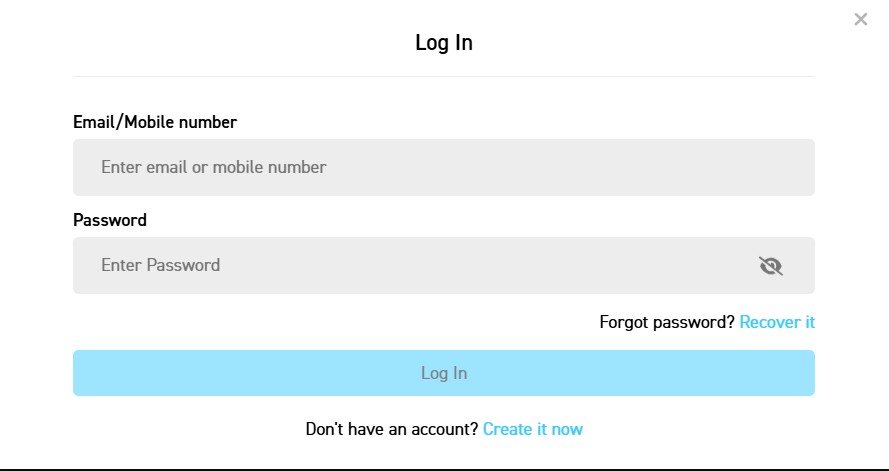
The FirstBet “Log In” modal showing the combined Email/Mobile number field, password input, and “Recover it” link
Step 1: Open FirstBet
Go to FirstBet.co.za in any browser. The site detects your device automatically and serves either the mobile or desktop layout. Tap the Log In button at the top right of the homepage. The Log In modal opens over the page rather than navigating to a new URL.
Step 2: Enter Your Email or Mobile Number
In the Email/Mobile number field, type either credential. FirstBet accepts both interchangeably. If you registered with mobile, type the full number including the leading digit (no +27 needed in this field). If you registered with email, type the full address. The field will not give you an error if you mix them up because the system tries both lookups in parallel.
Step 3: Enter Your Password
Type the password you set during registration. The eye icon on the right of the password field toggles visibility while typing, useful if you suspect a typo on a long password. Passwords are case-sensitive at FirstBet, so check your caps lock if you keep getting “incorrect password” errors.
Step 4: Tap Log In
The blue Log In button activates once both fields are filled. Tap it. If your credentials match, you are taken to your account dashboard within a second. If something is wrong, you will see an inline error message at the top of the form telling you what failed (incorrect password, account not found, etc.). Common error fixes are in the troubleshooting table below.
✅ Save Your Login for One-Tap Access
Most modern browsers prompt to save your password the first time you log in successfully. Accept the prompt on your personal phone or laptop, and your next session will autofill in under a second. On iOS Safari, you can also enable Face ID or Touch ID for the keychain-saved password, which means future logins use biometric auth without typing. Avoid saving credentials on shared or public devices.
📱 Logging In on Mobile, Desktop & Apps
FirstBet runs across mobile browser, desktop browser, an iOS app, an Android app, and a Huawei AppGallery app. The login form looks slightly different on each but the credentials are universal, so one set of email/mobile + password works everywhere.
| Device | Where to Tap | Auto-Save Support |
|---|---|---|
| Mobile browser (Chrome, Safari, Samsung Internet) | Top right Log In button | Browser password manager + Face ID / fingerprint via OS |
| Desktop browser | Top right Log In button | Browser password manager (Chrome, Firefox, Safari, Edge) |
| iOS App (Apple App Store) | Log In on the welcome screen | iCloud Keychain + Face ID / Touch ID |
| Android App (APK) | Log In on the welcome screen | Google Password Manager + biometric unlock |
| Huawei App (AppGallery) | Log In on the welcome screen | Huawei Mobile Services keychain + biometric |
For the step-by-step on installing each version of the FirstBet app, see our FirstBet app download guide.
A practical note: your account state stays in sync across every device. If you place a bet on mobile and then open the desktop site, your bet slip and balance reflect immediately. There is no “sign out of other devices” button, and multiple concurrent sessions are permitted, which is useful if you watch live sport on your TV browser while betting on your phone.
🔓 How to Recover a Forgotten Password
Below the password field on the login modal you will see “Forgot password? Recover it”. The “Recover it” text is the link to the password recovery flow. FirstBet’s recovery uses a one-time code sent to either the email or mobile number on file, so recovery is fast as long as you still have access to the credentials you registered with.
Step 1: Tap “Recover it”
From the Log In modal, tap the blue “Recover it” text directly below the password field. A new screen opens asking for the email or mobile number on your account.
Step 2: Enter Your Account Identifier
Type the email or mobile number you registered with. The system will send the recovery code to whichever you submit, so use the one you still have access to. If you registered with both email and mobile (the form captures both), either works.
Step 3: Enter the Recovery Code
An SMS or email lands within a minute with a numeric code. Type it on the recovery screen. If nothing arrives, check your SMS inbox first (codes sometimes filter to “Promotions” on Android), then your email spam folder. Wait 60 seconds before tapping Resend.
Step 4: Set a New Password
Type your new password twice for confirmation. Use a different password from the one you forgot rather than slight variations like adding a “1”, because this is when most account compromises happen, when the user reuses near-identical credentials. Once accepted, you are returned to the Log In screen and can sign in with the new password immediately.
⚠️ If You No Longer Have Access to Your Email or Mobile
If your registered phone number is RICA’d to a SIM you no longer have, or your old email is no longer accessible, the self-service “Recover it” flow will fail because you cannot receive the code. Contact FirstBet support directly via WhatsApp on +27 68 323 3139 or email support@firstbet.co.za. You will need to provide your registered name, ID number, and proof that you previously controlled the account (e.g., a previous transaction reference or screenshot). Recovery in this scenario takes 24-48 hours and may require a fresh FICA submission.
🔧 Common Login Errors & Fixes
Login failures usually come down to one of seven causes. Here is the quick lookup table.
| Error | Likely Cause | Fix |
|---|---|---|
| “Incorrect password” | Caps lock on, autofill picked up the wrong saved entry, or genuine memory lapse | Tap the eye icon to view your password as you type. Check caps lock. If still failing, use the “Recover it” link rather than guessing further |
| “Account not found” | Email or mobile number typo, or you never finished registration | Re-check the email/mobile field. If you abandoned a registration before the OTP step, the account does not exist and you need to register from scratch |
| “Account temporarily locked” | Too many failed login attempts in a short window (security throttle) | Wait 15 minutes, then try the “Recover it” flow rather than guessing again. Repeated failed logins extend the lockout |
| “Country not supported” | VPN routing your IP to a non-SA location | Disable VPN. FirstBet’s licences only permit play from inside SA, so the geo-IP check blocks login from non-SA addresses |
| Login button greyed out | One of the two fields is empty, or browser extension is blocking JavaScript | Confirm both fields have content. Disable ad-blockers and tracking extensions for firstbet.co.za, then refresh |
| Page never loads after Log In tap | Slow connection or server-side timeout | Wait 30 seconds. Refresh the page. Check that your data connection is active. If persistent, switch from wifi to mobile data or vice versa |
| “Account suspended” or “contact support” | Manual hold by FirstBet (FICA outstanding for too long, suspected duplicate, self-exclusion period, or AML review) | Contact support directly via WhatsApp +27 68 323 3139 or email support@firstbet.co.za with your registered name and ID number |
🚫 What If Your Account Is Locked
A locked account is different from a forgotten password. FirstBet locks accounts in three scenarios, each with its own resolution path.
⏱️ Temporary Lock (15 minutes)
Triggered by 5+ consecutive failed login attempts in a short window. This is an automated security throttle, not a flag on your account. Wait 15 minutes, then use the “Recover it” flow to reset the password rather than continuing to guess. The lock clears automatically once the timer expires.
🔒 Compliance Lock (FICA, AML, Duplicate)
Triggered by an outstanding compliance issue: FICA documents past their 3-month refresh window, anti-money-laundering review, or suspected duplicate account. The lock stays in place until you resolve the underlying issue. Contact FirstBet support, identify yourself with registered name and ID, and ask which compliance step is outstanding. Common resolutions: re-upload FICA documents, provide a source of funds explanation, or confirm sole control of the account.
🛑 Self-Exclusion Lock
If you previously activated FirstBet’s self-exclusion tool (a responsible gambling option), your account is locked for the duration you selected. Self-exclusion locks cannot be reversed before the chosen end date. This is by design and protects players who have asked to step away. Once the period ends, the account reactivates and you can log in normally. If you need additional support, contact the South African Responsible Gambling Foundation on 0800 006 008.
🛡️ Account Security Best Practices
A betting account holds your bankroll plus enough personal information to be useful to fraudsters (full name, ID number, address, banking details). The basic hygiene below takes ten minutes to set up and prevents almost every common attack we see in the SA market.
🔐 Six Security Practices Worth Adopting
- Use a unique password for FirstBet. Reused passwords are the single biggest source of account compromise. If a different site you use ever suffers a data breach, attackers will try those credentials on every gambling site they can find
- Make the password 12+ characters with mixed case, numbers and symbols. Length matters more than complexity, so a passphrase like “Aviator!ate-my-Bankroll-2026” is stronger than something like “P@ss123”
- Enable biometric autofill on your phone via Face ID, Touch ID, or fingerprint. This means your saved password is encrypted on the device and only released after a biometric check, even if the device is unlocked
- Never log in over public wifi without a trusted VPN. Coffee shop, airport, and hotel wifi are common environments for credential interception. If you must, use mobile data instead
- Watch for phishing SMS and emails. FirstBet will never ask for your password by email or WhatsApp. If you receive a message asking you to “verify your account” with a link, check the URL carefully. The legitimate domain is firstbet.co.za with no extra subdomains or hyphens
- Log out on shared devices by tapping the user icon and selecting Log Out. The session cookie expires automatically after a long idle period, but explicit logout is faster and safer on a borrowed laptop or hotel computer
📲 If You Suspect Unauthorised Access
Sign in using “Recover it” to immediately rotate your password. Then check your transaction history for unfamiliar deposits, bets, or withdrawal requests. If anything looks wrong, contact FirstBet support straight away via WhatsApp +27 68 323 3139 or live chat. Faster reporting equals better recovery odds.
💰 What to Do After Logging In
Logged in for the first time, or returning after a break? Here is a quick orientation of where to head next based on what you want to do.

🧭 Quick Orientation
- To deposit: tap the green Deposit button at the top right of your dashboard. Ozow and CapitecPay reflect within 2 minutes
- To claim your welcome bonus: see the bonus claim email step in our FirstBet review. The bonus is not credited automatically and requires a support request
- To check Friday Cashback: the bonus wallet shows any allocated bonus bets and the casino lobby shows allocated bonus spins. Full mechanics in our Friday Cashback guide
- To upload FICA: tap My Account, then Verification, and upload your ID plus proof of address. Required before first withdrawal
- To set deposit limits: tap My Account, then Responsible Gambling. Daily, weekly, and monthly limits are configurable
- To withdraw: Cashier > Withdraw, choose method (EFT, Cash Send, Ozow), confirm. Standard payout time is 3 minutes once FICA is verified
✅ Login Experience: Pros and Cons
✅ What We Like About FirstBet’s Login
- Combined Email/Mobile field means you do not have to remember which credential you registered with
- Eye icon password visibility toggle stops the typo-then-fail loop on long passwords
- “Recover it” link directly in the modal means password recovery is one tap away rather than buried in account settings
- Modal-based UI means the login form opens over the page, so you do not lose your place in the site if you came in mid-browse
- Native app login on iOS, Android and Huawei means biometric autofill works on every device tier in SA
- Multiple concurrent sessions allowed, useful for watching live sport on TV browser while betting on phone
⚠️ What Could Be Better
- No two-factor authentication option for the login itself. SMS OTP is only used during password recovery, not as a standing login factor, which means a leaked password is enough to access the account
- No “show active sessions” view, so you cannot see which devices are currently logged in or remotely sign them out
- Lockout windows are not shown to the user after failed attempts, so you do not know exactly when you can retry
- No social login options (Google, Apple), though for a regulated gambling site this is arguably a feature rather than a missing feature
Ready to Log In to Your FirstBet Account?
✅ Email or Mobile Login | ✅ Password Recovery | ✅ Mobile + Desktop + Apps | ✅ Biometric Autofill
❓ Frequently Asked Questions
How do I log in to my FirstBet account?
Go to FirstBet.co.za, tap the Log In button at the top right, enter the email address or mobile number you registered with, type your password, and tap Log In. The form accepts email and mobile interchangeably in the same field, so you do not have to switch modes.
What do I do if I forgot my First Bet password?
Tap the “Recover it” link below the password field on the Log In modal. Enter the email or mobile number on your account, then enter the recovery code that lands by SMS or email within a minute. Set a new password and you are signed back in.
Can I log in with my email or do I need to use my mobile number?
Either works. FirstBet’s login form has a single Email/Mobile number field that accepts both formats. Whichever you registered with (or both, if you provided both) will sign you in successfully as long as the password is correct.
Why is my First Bet account locked?
Three possibilities. (1) Temporary lock from too many failed login attempts, clears automatically in 15 minutes. (2) Compliance lock from FICA documents needing refresh, AML review, or suspected duplicate account, requires support contact. (3) Self-exclusion lock if you previously activated the responsible gambling tool, lasts for the duration you chose and cannot be reversed early.
Is FirstBet’s login secure?
The login uses HTTPS encryption end-to-end and supports biometric autofill via your device’s password manager (iCloud Keychain, Google Password Manager, Huawei Mobile Services). FirstBet does not currently offer two-factor authentication on the login itself, so a strong unique password and biometric autofill on a personal device are your two best protections.
Can I save my FirstBet login on my phone?
Yes. Most browsers prompt to save your password the first time you log in successfully. Accept the prompt on your personal phone and your next session will autofill in under a second. On iOS you can also enable Face ID or Touch ID via the keychain integration. Avoid saving credentials on shared devices, public computers, or work laptops.
What if I don’t get the password reset code?
Wait 60 seconds and tap Resend on the recovery screen. Check your SMS inbox first (sometimes filtered to “Promotions” on Android), then your email spam folder. If the registered phone number or email is no longer accessible, contact FirstBet support via WhatsApp on +27 68 323 3139. Recovery in this scenario is manual and takes 24-48 hours.
📚 Related Resources
- Banzostar (Pty) Ltd – Who Owns FirstBet – Company profile, dual licences, registered address and corporate background
- FirstBet Registration Guide – Step-by-step sign up walkthrough if you do not have an account yet
- FirstBet Casino Review – Full review covering games, banking, apps and the R10,000 welcome match
- FirstBet App Download Guide – Install the FirstBet app on iOS App Store, Android APK or Huawei AppGallery
- FirstBet Friday Cashback Guide – Weekly 10% sports refund + tiered Pragmatic Play bonus spins
- FICA Verification Guide South Africa – Required documents and how to fix common rejections
18+ Only. FirstBet is operated by Banzostar (Pty) Ltd and licensed by the Western Cape Gambling and Racing Board (10185107) and the Eastern Cape Gambling Board (ECBM 058). Gambling can be addictive and harmful if not controlled. Winners know when to stop. For help, contact South African Responsible Gambling Foundation: 0800 006 008 or WhatsApp 076 675 0710.
Disclaimer: This guide was last updated April 2026. Login flows and account security tools may change. Always verify current details on the official FirstBet website. Gambling involves risk.
Affiliate Disclosure: iBets.co.za may receive commission through affiliate links, but this does not influence our independent reviews and analysis.
Licensing: FirstBet is operated by Banzostar (Pty) Ltd, Registration Number 2016/131538/07. Dual-licensed by the Western Cape Gambling and Racing Board (licence 10185107) and the Eastern Cape Gambling Board (licence ECBM 058). 18+. Winners know when to stop.