📄 FICA Verification Guide

Apex Bets FICA Verification Guide
Powered by Sumsub | 2 Steps | Required Before Withdrawals
Identity document upload + liveness check — complete walkthrough with real screenshots
⚡ Verification Quick Facts
Steps
2
Processing Time
Up to 24hrs
KYC Provider
Sumsub
ID Types Accepted
5
Max File Size
5MB
Liveness Check
Required
📋 Table of Contents
- 📋 What Is FICA and Why Does Apex Bets Require It?
- ✅ What You Need Before Starting
- 📝 How to Complete FICA Verification — Step by Step
- → Step 1: Initiate Verification
- → Step 2: Select Your Document Type
- → Step 3: Upload Your Document
- → Step 4: Liveness Check (Face Scan)
- 📸 Photo Tips — How to Avoid Rejection
- ⏱️ After Submission — What Happens Next
- 🏠 Proof of Address — When & Why It May Be Requested
- 🔧 Troubleshooting — Common Rejection Reasons & Fixes
- ❓ Frequently Asked Questions
ApexBets uses Sumsub — a third-party KYC (Know Your Customer) platform — to handle FICA verification. The process has two steps: an identity document upload and a liveness check (face scan). Both are completed inside the Sumsub widget, which launches directly within your apexbets.co.za account. You do not need to send documents by email or upload files to a separate portal.
FICA verification is required before Apex Bets will process any withdrawal. You can register, deposit, and play without completing it — but the cashout option remains locked until Sumsub approves your submission. Submit your documents as early as possible after registration so that verification is already complete when you want to withdraw. For the full withdrawal process once FICA is approved, see the Apex Bets Withdrawal Guide.
📋 What Is FICA and Why Does Apex Bets Require It?
FICA stands for the Financial Intelligence Centre Act — South African legislation that requires all licensed financial and gambling operators to verify the identity of their customers before releasing funds. It exists to prevent money laundering and financial fraud. Every WCGRB-licensed bookmaker in South Africa, including Apex Bets, Pantherbet, Gbets, and Lulabet, must enforce FICA as a condition of their licence.
📋 What FICA Means for You as a Player
- Deposit and play freely — FICA is not required to fund your account or access any games
- No withdrawal without FICA — your first cashout request will be held until verification is complete
- One-time process — once approved, you do not need to re-verify for future withdrawals
- Data is secure — Sumsub is an internationally certified KYC provider; your documents are encrypted in transit and at rest
- Sumsub ID shortcut — if you have previously verified your identity on another platform using Sumsub, you can reuse that stored data to skip re-uploading documents
✅ What You Need Before Starting
Before launching the Sumsub verification flow, have the following ready. Starting without them can cause the session to time out before you complete the process:
✅ What to Prepare
- One valid identity document — choose from the five options below. Must be current and not expired.
- A device with a front-facing camera — required for the liveness check. A smartphone is ideal. Desktop webcams work but lower-quality sensors may struggle with the face scan.
- Good lighting — natural light facing you directly (not behind you) produces the clearest results for both document photos and the face scan
- An image file under 5MB — accepted formats are JPG, PNG, HEIC, WEBP, or PDF. Most smartphone photos are well within this limit.
🪪 Accepted Identity Documents
- South African Passport
- South African Driving Licence
- Identity Card (smart ID card)
- Green ID Booklet (older green barcoded ID book)
- Residence Permit (for non-SA citizens residing in South Africa)
Note: The document must match the name and ID number you used when registering your apexbets.co.za account. If these do not match, your verification will be rejected. Contact support via live chat before submitting if you believe there is a discrepancy in your registration details.
📝 How to Complete FICA Verification — Step by Step
The entire verification flow runs inside the Sumsub widget — you do not leave the apexbets.co.za environment. To begin, log in to your account and navigate to My Account → Verification. The Sumsub widget will launch automatically.
Step 1: Initiate Verification
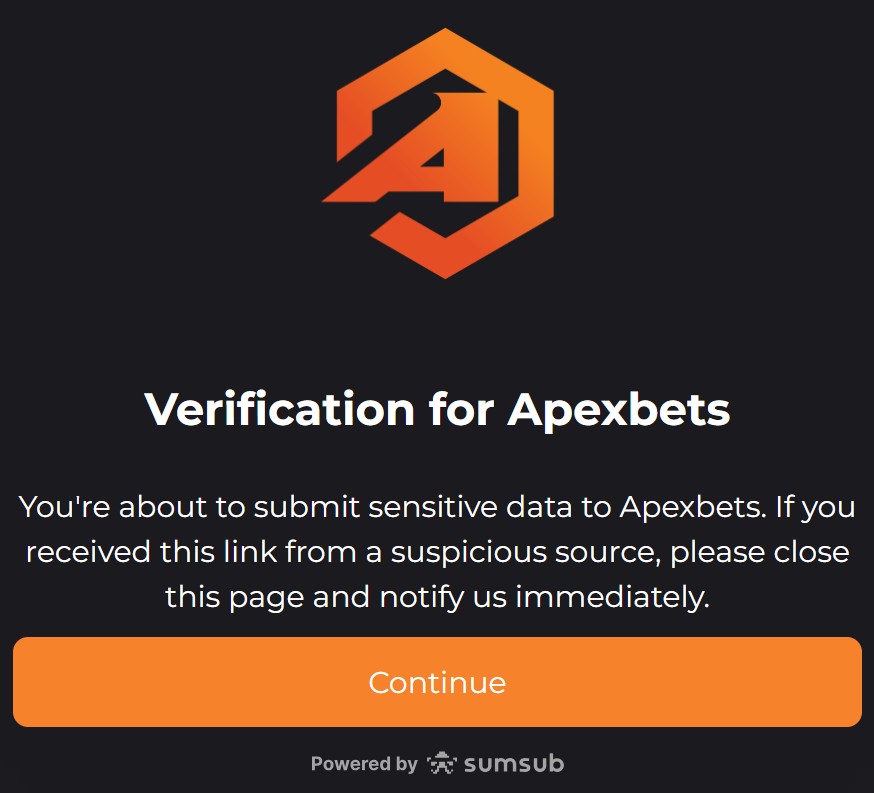
ℹ️ The Security Warning Screen — Don’t Be Alarmed
The first screen you see will display the Apex Bets logo and the message: “You’re about to submit sensitive data to Apexbets. If you received this link from a suspicious source, please close this page and notify us immediately.” This is a standard Sumsub security notice shown on every KYC verification. It is not a warning that something is wrong — it is a protective measure to help players identify phishing attempts. Since you launched verification from inside your legitimate apexbets.co.za account, you can safely tap “Continue” to proceed.
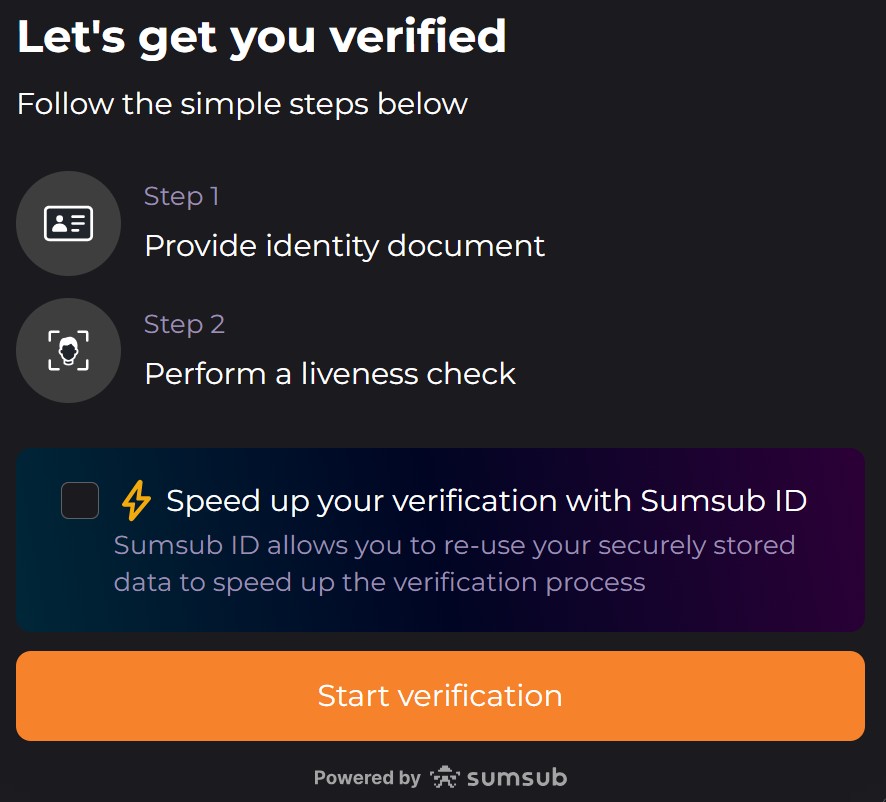
📋 The Sumsub Overview Screen
After the security notice, Sumsub shows you a summary of what is required before you begin:
- Step 1: Provide identity document
- Step 2: Perform a liveness check
You will also see an optional prompt: “Speed up your verification with Sumsub ID.” If you have previously completed KYC on another platform that uses Sumsub, you can tick this option to reuse your securely stored data and skip re-uploading documents. If you have not used Sumsub before, leave this unchecked and tap “Start verification”.
Step 2: Select Your Document Type
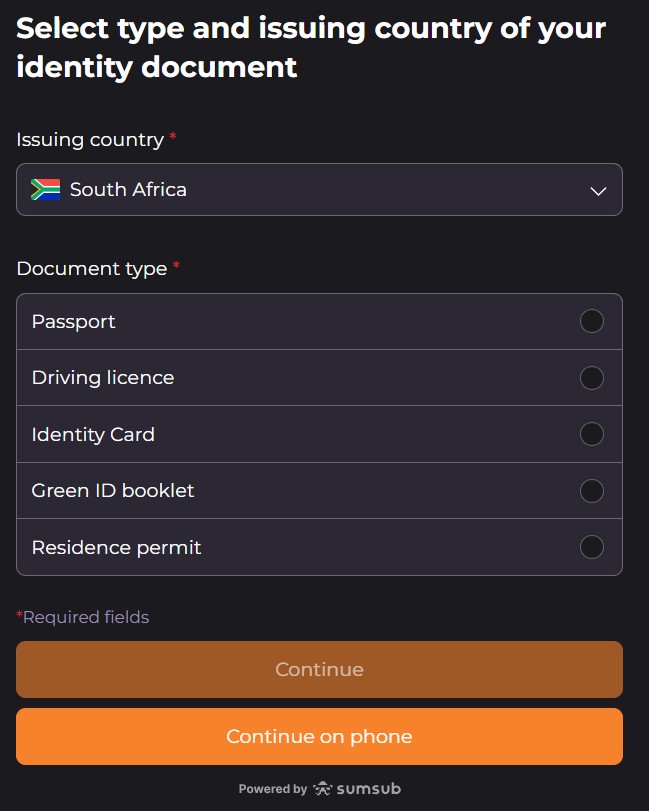
🪪 Selecting Your Document
The next screen is headed “Select type and issuing country of your identity document.” The issuing country will be pre-set to South Africa with the SA flag. Do not change this unless you hold a foreign residence permit. Below the country field, select your document type by tapping the appropriate option:
- Passport — SA passport (green booklet)
- Driving licence — SA driver’s licence card
- Identity Card — SA smart ID card (the credit card-sized green card)
- Green ID booklet — the older green barcoded ID book
- Residence permit — for foreign nationals residing in South Africa
Once you have selected a document type, the “Continue” button activates. You can also tap “Continue on phone” if you started on desktop and prefer to complete the photo upload and face scan on your mobile — Sumsub will send a link to continue on your phone’s camera.
Step 3: Upload Your Document
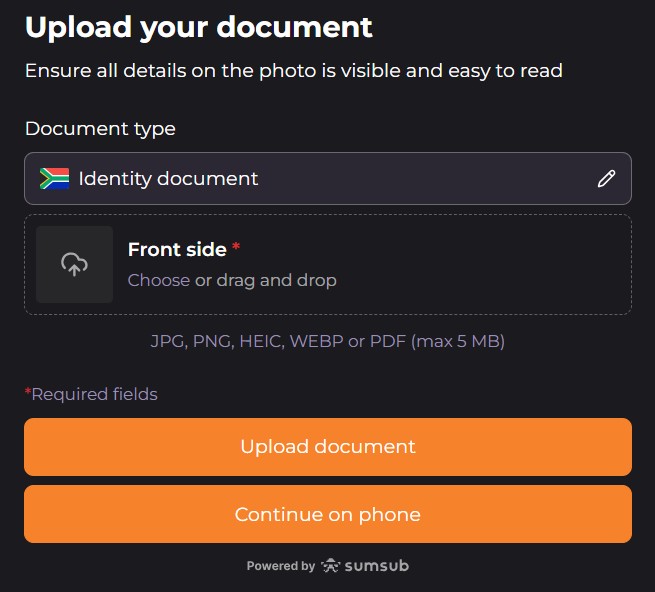
📤 Upload Screen Details
The upload screen is headed “Upload your document” with the instruction: “Ensure all details on the photo is visible and easy to read.” The screen shows:
- Document type: Identity document (pre-filled with SA flag based on your selection)
- Front side (required): Tap “Choose” to select a file from your device, or drag and drop if on desktop
- Accepted file formats: JPG, PNG, HEIC, WEBP, or PDF — maximum 5MB per file
Two submission buttons appear at the bottom:
- “Upload document” — select a file already saved on your device
- “Continue on phone” — switch to your mobile camera to capture the document live (recommended if you don’t have a pre-saved photo)
Powered by Sumsub is shown at the bottom of the form — this confirms you are within the legitimate Sumsub KYC environment.
Step 4: Liveness Check (Face Scan)
🤳 What Is a Liveness Check?
After your document is uploaded, Sumsub performs a liveness check — a short face scan using your device’s front camera. This confirms that the person submitting the documents is physically present and matches the photo on the identity document. It is not a static selfie — Sumsub will prompt you to perform a brief action (such as turning your head slowly) to verify you are a real person and not a photo being held up to a camera.
- Grant camera access when prompted by your browser or app
- Position your face clearly within the on-screen frame
- Ensure your face is well-lit — avoid strong backlighting from a window behind you
- Remove glasses, hats, or face coverings that obscure your features
- Follow any on-screen movement prompts calmly — jerky or rapid movements can cause the scan to fail
- The entire liveness check takes under 30 seconds on a standard smartphone
Tip: If the liveness check fails on desktop, use the “Continue on phone” option — smartphone front cameras produce more reliable results for Sumsub’s face-matching algorithm than laptop webcams.
📸 Photo Tips — How to Avoid Rejection
Poor photo quality is the single most common reason Sumsub rejects identity documents. Sumsub’s automated system checks for legibility before a human reviewer ever sees it — a blurry or glare-affected photo will be rejected instantly. Follow these tips to pass on the first attempt:
✅ Do This
- Photograph your document on a plain, dark, non-reflective surface — a dark desk or table works well
- Use natural light or overhead light in front of you — avoid flash which causes glare on laminated ID surfaces
- Ensure all four corners of the document are visible — do not crop edges
- Hold the camera directly above the document, parallel to the surface — no angle shots
- Check the photo on screen before uploading — zoom in to confirm all text and the ID number are sharp and readable
- Use your phone’s standard camera app rather than a document scanner app — Sumsub prefers standard photo files
- For smart ID cards, photograph front and back if both sides are required
🚫 Avoid These
- Flash photography — creates glare that obscures the ID number and makes text unreadable
- Blurry photos — tap to focus before capturing; check sharpness before uploading
- Fingers covering any part of the document — hold the ID flat on a surface and photograph from above
- Photos of photos — do not scan a printed photocopy; Sumsub requires the original document
- Expired documents — Sumsub will reject any document past its expiry date
- Damaged or altered documents — torn, faded, or tampered IDs cannot be verified
- Screenshots of digital documents — always use the original physical document
⏱️ After Submission — What Happens Next
Once you complete both the document upload and the liveness check, your submission enters the review queue. Sumsub first runs an automated check — this typically resolves within minutes for clean, clear submissions. If the automated check cannot confirm your identity, the submission is escalated to a human reviewer. The full review process takes up to 24 hours on business days.
⏱️ Review Outcomes
- Approved: Your account status updates to verified. The withdrawal option becomes available in your cashier immediately. You will receive a notification from apexbets.co.za confirming approval.
- Pending: Your submission is still under review. Check My Account → Verification for a status update. Do not resubmit while a review is in progress — duplicate submissions delay the process.
- Rejected: Sumsub or Apex Bets will notify you of the reason. You will be prompted to resubmit. The most common rejection reasons and their fixes are covered in the troubleshooting section below.
🏠 Proof of Address — When & Why It May Be Requested
The two-step Sumsub flow — identity document plus liveness check — covers the initial stage of FICA verification at ApexBets. However, FICA legislation requires South African licensed operators to verify both identity and residential address as part of full customer due diligence. Proof of address (POA) may therefore be requested separately, either after the Sumsub flow completes or when you reach a withdrawal threshold that triggers enhanced due diligence.
📋 When Proof of Address May Be Requested
- Before or shortly after your first withdrawal request — common trigger point for full FICA compliance checks
- When your cumulative withdrawals exceed a certain threshold — SA gambling regulations require enhanced due diligence at higher transaction volumes
- If Apex Bets’ compliance team flags a mismatch between your registered address and your ID document
- As part of a routine account review — FICA requires operators to keep customer information up to date on an ongoing basis
✅ Accepted Proof of Address Documents
- Bank statement — showing your name and residential address, dated within the last 3 months. This is the most commonly accepted POA for SA gambling platforms as most players have digital access to one.
- Utility bill — electricity, water, or municipal rates account in your name, dated within 3 months
- Phone bill — a postpaid mobile or landline account statement showing your name and address
- Short-term insurance policy — showing residential address on the policy schedule
Key rule: The address on your POA document must match the residential address you entered during apexbets.co.za registration. If you have moved since registering, contact support to update your address before submitting POA — a mismatch will cause rejection.

Example of a proof of address upload request from an SA-licensed operator — Apex Bets may present a similar screen when POA is required.
💡 Bank Statement as POA — The Easiest Option for Most Players
Most SA players no longer receive paper utility bills — everything goes to email or an app. A bank statement is typically the most accessible POA document and is accepted by all SA-licensed gambling operators. Download a PDF statement directly from your banking app (FNB, ABSA, Capitec, Nedbank, Standard Bank all allow this). Make sure the statement is dated within the last 3 months and clearly shows your full name and residential address — not just your postal address. Capitec statements in particular sometimes default to showing only the postal address; ensure the physical address is visible before submitting.
🔧 Troubleshooting — Common Rejection Reasons & Fixes
“Document not readable” or “Image quality too low”
Fix: Retake the photo in better lighting without flash. Place the document flat on a plain dark surface, hold your camera directly above it, tap to focus, and ensure all text is sharp before uploading. Avoid HEIC format if on iPhone — save as JPG for most reliable results on Sumsub.
“Name does not match account details”
Fix: The name on your identity document must exactly match the name entered during apexbets.co.za registration. If there is a typo in your registered name, contact ApexBets support before resubmitting — reach live chat from the site or email helpdesk@apexbets.co.za. Support can correct registration data entry errors, but this requires identity confirmation on their end first.
“Document expired”
Fix: Sumsub automatically rejects expired documents. Submit a different document type that is still valid — for example, if your ID book is expired, use your driver’s licence or passport instead. If all your documents are expired, you will need to renew at your nearest Home Affairs office before verification can proceed.
Liveness check keeps failing
Fix: Switch to your smartphone using the “Continue on phone” option — it reliably outperforms laptop webcams for face-matching. Ensure your face is well-lit from the front, remove glasses or headwear, and follow the on-screen prompts slowly and deliberately. Bright natural daylight (not direct sunlight) is ideal. If liveness checks repeatedly fail despite good conditions, contact ApexBets support on 063 604 0005 or via helpdesk@apexbets.co.za for manual review assistance.
Verification is stuck on “Pending” for more than 24 hours
Fix: Do not resubmit — duplicate submissions create a backlog. Contact ApexBets support directly via live chat (available until 23:00 daily) or email helpdesk@apexbets.co.za quoting your registered username and the date of submission. The support team can check the status of your submission with Sumsub and escalate if it has stalled.
❓ Frequently Asked Questions
Do I need to verify my identity to play at Apex Bets?
No — you can deposit and play all games without completing FICA verification. However, your first withdrawal will be blocked until verification is approved. Submit your documents via My Account → Verification as early as possible after registration so there are no delays when you want to cash out.
What KYC system does ApexBets use?
ApexBets uses Sumsub, an internationally certified KYC provider. The verification runs entirely within the Sumsub widget embedded in your Apex Bets account — you do not submit documents by email or through a third-party website. The “Powered by Sumsub” badge on every screen confirms you are in the legitimate verification environment.
What documents are accepted for Apex Bets FICA verification?
ApexBets via Sumsub accepts five South African identity documents: Passport, Driving licence, Identity Card (smart ID), Green ID booklet, and Residence permit. The document must be valid (not expired), undamaged, and match the name and ID number on your apexbets.co.za account exactly.
What is the liveness check and why is it required?
The liveness check is a short face scan performed by Sumsub using your device’s front camera. It confirms that the person submitting the documents is physically present and matches the photo on the identity document — preventing identity theft where someone uses another person’s ID. It is not a static selfie; Sumsub will prompt a brief movement to confirm you are live. It takes under 30 seconds on most smartphones.
How long does Apex Bets FICA verification take?
Clean submissions with clear document photos typically complete the automated Sumsub check within minutes. If escalated to human review, the full process takes up to 24 hours on business days. Do not resubmit while a review is pending — duplicate submissions extend the queue. Track your status under My Account → Verification.
Will Apex Bets ask for proof of address?
Possibly — FICA law requires licensed SA operators to verify both identity and residential address as part of full customer due diligence. The Sumsub flow covers identity and liveness, but apexbets.co.za may request a proof of address document separately — typically before or at your first withdrawal, or when cumulative transactions reach a compliance threshold. Accepted documents include a bank statement, utility bill, or phone bill dated within 3 months, showing your name and the residential address on your account. A bank statement downloaded from your banking app is the most convenient option for most SA players.
— do I need to do it again?
Not necessarily. When the Sumsub widget launches, you’ll see an option to “Speed up your verification with Sumsub ID.” Ticking this allows Sumsub to reuse your previously verified data from another Sumsub-integrated platform. This skips the document upload and liveness check if your data is still valid. If this option fails or you have not used Sumsub before, proceed with the standard two-step flow.
Ready to Unlock Withdrawals at Apex Bets?
✅ Sumsub-Powered | ✅ Takes Under 5 Minutes | ✅ One-Time Process | ✅ WCGRB Licensed
📚 Related Apex Bets Guides
- Apex Bets Withdrawal Guide — EFT Secure & OTT Voucher cashout walkthrough with limits and processing times
- Apex Bets Registration & Login Guide — Sign up, OTP verification & dashboard walkthrough
- Apex Bets Bonus & Promo Code Guide — R30,000 welcome package + FREESPIN100 free spins claim guide
- Apex Bets Casino Review — Full platform verdict: games, bonuses, payments & honest rating
- Letsbet (Pty) Ltd Company Profile — WCGRB licensing & ownership verification
18+ Only. Apex Bets is operated by Letsbet (Pty) Ltd, licensed by the Western Cape Gambling and Racing Board (Licence 10194002-001). Gambling can be addictive and harmful if not controlled. Winners know when to stop. For help, contact the South African Responsible Gambling Foundation: 0800 006 008 or WhatsApp 076 675 0710.
Disclaimer: This guide was last updated March 2026. Verification processes and document requirements may change. Always verify current details on the official apexbets.co.za website.
Affiliate Disclosure: iBets.co.za may receive commission through affiliate links on this page, but this does not influence our independent guides and analysis.
Licensing: Apex Bets is operated by Letsbet (Pty) Ltd (Reg. 2023/963735/07), licensed by the WCGRB under licence 10194002-001. 18+. Winners know when to stop.