
📱 Mobile App Guide

Easybet App Download Guide
Android APK | iOS Web App | Data-Free App | Huawei AppGallery
Free download, step-by-step installation, and troubleshooting for all devices
⚡ Quick Facts
APK Size
~15 MB
Android
5.0+
iOS
Web App
Data-Free
R0 Data
Platforms
4
Cost
Free
📋 Guide Contents
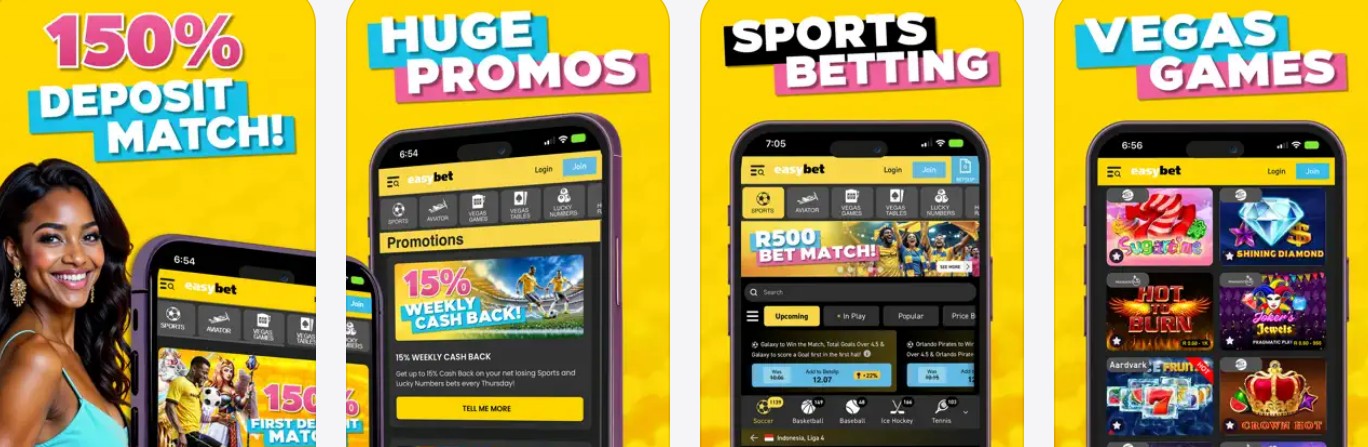
The Easybet app is available as a free download for Android (APK from easybet.co.za), iOS (Safari web app), Huawei (AppGallery), and a separate data-free version that lets you bet on sports without consuming any mobile data or airtime. The Android APK is approximately 15MB, installs in under 2 minutes, and mirrors the full desktop experience — casino games, sports betting, live betting, deposits, withdrawals, and account management all function identically. Since Google Play restricts real-money gambling apps in most regions, the APK is downloaded directly from the official Easybet website — this is standard practice for all South African betting apps.
Easy Bet’s data-free app is unique among SA bookmakers and is a genuine differentiator for the 91% of Easybet users who access the platform via mobile. With data costs in South Africa still averaging R149/GB, the data-free option saves regular bettors R75–R120 per month based on typical sports betting usage of 500–800MB. This guide walks you through every installation method step by step, compares features across all four app versions, and provides fixes for the most common installation problems. For a complete platform overview covering bonuses, banking, games, and licensing, see our full Easybet Casino review.
📱 Easybet Android App Download & Installation
The Easy Bet Android app is not available on the Google Play Store — this is standard for all SA betting apps because Google restricts real-money gambling applications in most countries. Instead, you download the APK file directly from the official Easy Bet website. The process takes under 2 minutes and works on any Android device running version 5.0 (Lollipop) or higher with at least 50MB of free storage.
📝 Step 1: Allow Unknown Sources
Before downloading, you need to allow your Android phone to install apps from outside the Play Store. This is a standard Android security setting — not a risk when downloading from the official Easy Bet site.
- Android 8.0+: Go to Settings → Apps → Special Access → Install Unknown Apps → toggle ON for your browser (Chrome, Samsung Internet, etc.)
- Android 5.0–7.x: Go to Settings → Security → toggle ON “Unknown Sources”
Tip: On newer Samsung devices, the path is Settings → Biometrics and Security → Install Unknown Apps.
📝 Step 2: Download the APK
Open your mobile browser and navigate to easybet.co.za. Scroll to the website footer where you’ll find the “Download App” button with the Android icon. Tap it to start the APK download — the file is approximately 15MB and should download within 30 seconds on a typical 4G connection.
Important: Only download the APK from the official Easy Bet website. Third-party APK sites may host outdated or modified versions that compromise your account security.
📝 Step 3: Install & Launch
Once the download completes, tap the notification or open your Downloads folder and tap the Easybet APK file. Your device will ask for confirmation — tap “Install”. Installation takes 10–20 seconds. When complete, tap “Open” to launch the app.
First launch: Log in with your existing Easy Bet credentials (mobile number or email + password). If you’re new, register directly in the app and enter promo code IBET50 to claim your R50 free bonus + 50 free spins.
⚠️ “App Not Installed” Error?
If you see this error: Check that you have enough storage space (50MB minimum), that “Unknown Sources” is enabled for your browser, and that you don’t have an older version of the app already installed. Uninstall the old version first, then retry the installation. See the troubleshooting section below for more fixes.
🍎 Easybet iOS Setup (iPhone & iPad)
Easy Bet does not have a native iOS app on the Apple App Store. Instead, the platform uses a Progressive Web App (PWA) that you add to your iPhone or iPad home screen via Safari. The PWA loads the full Easybet mobile site in a standalone window — it looks and behaves like a native app with no browser toolbar, full-screen display, and home screen icon. All features work identically: sports betting, casino games, live casino, deposits via Ozow, and instant withdrawals.
📝 Step 1: Open Safari & Visit Easybet
Open Safari (not Chrome — the “Add to Home Screen” feature only works in Safari on iOS). Navigate to easybet.co.za and log in to your account or complete registration.
📝 Step 2: Tap the Share Button
Tap the Share icon (the square with an upward arrow) at the bottom of Safari. Scroll down the share menu until you see “Add to Home Screen” and tap it.
📝 Step 3: Name & Add
Safari shows a preview of the web app with a name field. Keep the default name or rename it to “Easybet”. Tap “Add” in the top-right corner. The Easybet icon now appears on your home screen — tap it to launch the full-screen web app experience.
iOS performance note: The PWA runs through Safari’s WebKit engine, so performance is comparable to the mobile browser version. On iPhone 12 and newer, page loads average 1–2 seconds on 4G. On older devices (iPhone 8 or earlier), expect slightly longer load times for casino game lobbies. Push notifications are not supported in the iOS PWA — you’ll receive bonus alerts and cashback notifications via SMS and email instead.
📶 Data-Free App: Bet Without Using Mobile Data
The Easy Bet data-free app is the platform’s standout feature and is unique among South African bookmakers. It allows you to browse sports markets, place pre-match and live bets, check results, view your balance, and manage your account — all without consuming any mobile data or airtime. The data-free functionality works on all major South African mobile networks: Vodacom, MTN, Cell C, and Telkom.
Based on average sports betting usage patterns, regular bettors typically consume 500–800MB per month browsing odds, placing bets, and checking results. At South Africa’s average data cost of R149/GB, the data-free app saves you approximately R75–R120 monthly — that’s R900–R1,440 per year redirected from data costs to your betting bankroll.
📱 How to Access the Data-Free App
- Option 1 — Browser: Visit the Easybet data-free URL on your mobile browser (link available in the Easy Bet website footer under “Data-Free”)
- Option 2 — APK: Download the dedicated data-free APK from the Easy Bet website footer (separate from the standard app)
- Option 3 — USSD: Dial the Easy Bet USSD shortcode from your phone to access basic betting functions
Network requirement: Your SIM card must be active on a supported network (Vodacom, MTN, Cell C, or Telkom). Wi-Fi connections do not qualify for data-free access — the zero-rating applies to mobile network traffic only.
🚫 What the Data-Free App Does NOT Include
- Casino games: Slots, live casino, crash games (Aviator, Spaceman), and table games require a data connection because these stream content from external game provider servers
- Push notifications: Alert and promotion notifications require data
- Video streaming: Any live-streamed content requires a data connection
This is a technical limitation — casino games stream from Pragmatic Play, Evolution Gaming, and other provider servers, which can’t be zero-rated. For sports bettors who primarily use Easy Bet for pre-match and live wagers, the data-free app delivers full functionality at zero data cost. If you also play slots or Aviator, install both the standard app (for casino) and the data-free app (for sports) on the same device.
📲 Huawei AppGallery Installation
Huawei devices manufactured after 2019 use Huawei Mobile Services (HMS) instead of Google Mobile Services, which means they can’t access Google Play. Easy Bet may be available through the Huawei AppGallery — search for “Easybet” in the AppGallery app on your device. If the app appears, tap “Install” and follow the on-screen prompts. It installs like any standard AppGallery app with no additional settings needed.
If the Easy Bet app is not listed in AppGallery, download the Android APK directly from the Easybet website instead. The installation process is identical to the Android steps above — enable “Install from Unknown Sources” in Settings → Security → More Settings, then download and install the APK. Huawei devices running EMUI 9.0 or newer support sideloaded APK files.
📊 App vs Mobile Website vs Data-Free: Feature Comparison
Easy Bet offers four ways to access the platform from a mobile device. The table below compares features across all four options — based on testing conducted on a Samsung Galaxy A54 (Android 14) and iPhone 14 (iOS 17) in February 2026.
| Feature | Android App | iOS Web App | Data-Free App | Mobile Browser |
|---|---|---|---|---|
| Sports Betting | ✅ Full | ✅ Full | ✅ Full | ✅ Full |
| Casino / Slots | ✅ 1,100+ games | ✅ 1,100+ games | ❌ Not available | ✅ 1,100+ games |
| Live Casino | ✅ Full | ✅ Full | ❌ Not available | ✅ Full |
| Aviator / Crash | ✅ Full | ✅ Full | ❌ Not available | ✅ Full |
| Deposits / Withdrawals | ✅ Full | ✅ Full | ✅ Full | ✅ Full |
| Data Cost | Standard rates | Standard rates | R0 (Free) | Standard rates |
| Biometric Login | ✅ Fingerprint/Face | ❌ Not supported | ❌ Not supported | ❌ Not supported |
| Push Notifications | ✅ Promos & Results | ❌ Not supported | ❌ Not supported | ❌ Not supported |
| Home Screen Icon | ✅ Auto | ✅ Manual add | ✅ Auto | ❌ No |
| Lucky Numbers | ✅ Full | ✅ Full | ✅ Full | ✅ Full |
Our recommendation: If you bet on sports primarily, install the data-free app for daily use and save your mobile data for everything else. If you play casino games, slots, or Aviator, install the standard Android app for the best experience including biometric login and push notifications for weekly cashback promotions. You can have both apps installed simultaneously — they operate independently.
⚙️ App Settings & Optimisation Tips
After installing the Easy Bet app, configure these settings to get the best experience. All settings are accessed via the profile/menu icon (top-right corner of the app) → Account Settings.
🔐 Enable Biometric Login (Android Only)
Once logged in, navigate to Account Settings → Security → Biometric Login. Toggle it ON and scan your fingerprint or face when prompted. This saves you from typing credentials each time — particularly useful if you switch between the standard and data-free apps throughout the day. Biometric login requires Android 6.0+ and a device with a fingerprint sensor or face recognition hardware.
🔔 Notification Preferences
The Easy Bet Android app supports push notifications for bet results, promotional offers, and cashback alerts. To configure: go to Account Settings → Notifications. We recommend keeping “Promotion Alerts” ON — this is how you’ll know when your Monday slots cashback, Tuesday Aviator bonus flights, or Thursday sports cashback is ready to claim. Turn off “Marketing” if you don’t want general advertising.
💾 Managing Storage & Updates
The Easybet app caches game thumbnails and frequently accessed pages to improve load speeds. Over time, this cache can grow to 50–100MB. To clear it: go to your phone’s Settings → Apps → Easybet → Storage → Clear Cache. This won’t log you out or affect your account. The app checks for updates automatically on launch — when a new version is available you’ll see an in-app prompt to download the latest APK. Always update promptly to access new features and security patches.
🔧 Troubleshooting Common Issues
“App Not Installed” or “Installation Failed”
Fix: Ensure “Install from Unknown Sources” is enabled specifically for your browser app (not just globally). Check that you have at least 50MB free storage. If an older Easy Bet version is installed, uninstall it first (Settings → Apps → Easybet → Uninstall), then re-download and install the latest APK. On Samsung devices running One UI 5+, you may also need to disable “Auto Blocker” temporarily: Settings → Security → Auto Blocker → toggle OFF.
“Add to Home Screen” Not Showing on iPhone
Fix: This option only appears in Safari — not Chrome, Firefox, or any other iOS browser. Make sure you’re using Safari. If you still don’t see it, scroll down in the Share menu — it may be below the fold. On iOS 16+, you can also tap “Edit Actions” at the bottom of the Share menu to add “Add to Home Screen” to your favourites for easier access.
Data-Free App Not Working (Still Using Data)
Fix: Disconnect from Wi-Fi — data-free access only works on mobile networks (Vodacom, MTN, Cell C, Telkom), not Wi-Fi. Ensure you’re accessing the data-free-specific URL or using the dedicated data-free APK, not the standard Easy Bet app. If your network isn’t zero-rated, check the Easy Bet website footer for the current data-free access link — the URL may have updated. Restart your phone if you recently switched SIM cards.
App Crashes on Launch or Freezes
Fix: Clear the app cache (Settings → Apps → Easybet → Storage → Clear Cache). If that doesn’t work, clear app data (this will log you out). Ensure your Android OS is version 5.0 or newer. On devices with less than 2GB RAM, close background apps before launching Easy Bet to free up memory. If the problem persists, uninstall and re-download the latest APK from easybet.co.za.
Can’t Log In After App Update
Fix: App updates sometimes reset stored credentials. Re-enter your mobile number/email and password manually. If you’ve forgotten your password, tap “Forgot Password” on the login screen — Easy Bet sends a reset link via SMS within seconds. If biometric login stops working after an update, re-enable it in Account Settings → Security → Biometric Login. For persistent login issues, contact Easy Bet support via 24/7 live chat or WhatsApp.
❓ Frequently Asked Questions
Is the Easybet app free to download?
Yes. All four Easy Bet app versions — Android APK, iOS web app, Huawei AppGallery, and data-free — are completely free to download and install. The only cost is standard mobile data usage during the download (approximately 15MB for the Android APK). The data-free version costs nothing to use once installed.
Why isn’t the Easy Bet app on Google Play or the App Store?
Google Play restricts real-money gambling apps in most regions, including South Africa. This affects all SA bookmakers — not just Easy Bet. Apple’s App Store has similar restrictions for web-based casino apps. Downloading the APK directly from easybet.co.za is the standard and safe method. Easy Bet is licensed by the Eastern Cape Gambling Board (ECBM 029), so the app is fully legal in South Africa.
Can I register a new Easybet account through the app?
Yes. Tap “Join” in the app to start registration. Enter your mobile number, verify via SMS OTP, complete your personal details, and enter promo code IBET50 to claim R50 free + 50 spins on Sweet Bonanza. Registration is identical across all app versions and the desktop website. For a full walkthrough, see our Easybet promo code guide.
Does the data-free app work on all South African networks?
The Easy Bet data-free app works on Vodacom, MTN, Cell C, and Telkom mobile networks. It does not work on Wi-Fi connections or virtual/MVNO networks. Your SIM must be active and have network coverage — the zero-rating is applied at the network level, so no airtime or data balance is required to place sports bets through the data-free portal.
Can I play Aviator on the Easybet app?
Yes — Aviator and all other crash games are available on the Android app, iOS web app, and mobile browser versions. Aviator is not available on the data-free app because it streams from Spribe’s servers and requires a data connection. Easy Bet offers 10% weekly Aviator cashback (up to R10,000 in Bonus Flights credited every Tuesday), which works the same regardless of whether you play on the app or desktop.
How do I update the Easybet app?
The Android app checks for updates automatically when you open it. If an update is available, you’ll see a prompt to download the latest version. Tap the update button, and the new APK downloads and installs over the existing app without losing your login details. For the iOS web app, updates happen server-side — you always access the latest version automatically. The data-free app updates the same way as the standard Android app.
Is my account safe on the Easybet app?
Yes. The Easybet app uses the same SSL encryption and security infrastructure as the desktop website. All deposits and withdrawals are processed through encrypted channels, and FICA verification is required before withdrawals can be processed. The Android app also supports biometric login (fingerprint or face recognition) as an additional security layer. Easy Bet is operated by Easybet Group (Pty) Ltd and regulated by the Eastern Cape Gambling Board.
Ready to Download Easybet?
✅ Free Download | ✅ Data-Free Option | ✅ R50 Free with IBET50 | ✅ Instant Withdrawals
📚 Related Resources
- Easybet Casino Review – Complete guide covering games, bonuses, banking, and licensing
- Easybet Promo Code IBET50 – R50 free + 50 spins claiming guide and bonus terms
- Easybet Withdrawal Guide – All withdrawal methods, processing times, and troubleshooting
- Easybet Cashback Guide – R31,000 weekly cashback schedule and claiming instructions
- Mobile Casino Apps South Africa – Compare app downloads across SA bookmakers
18+ Only. Easy Bet is licensed by the Eastern Cape Gambling Board (ECBM 029). Gambling can be addictive and harmful if not controlled. Winners know when to stop. For help, contact South African Responsible Gambling Foundation: 0800 006 008 or WhatsApp 076 675 0710.
Disclaimer: This guide was last updated February 2026. App features, download processes, and bonus terms may change. Always verify current details on the official Easybet website.
Affiliate Disclosure: iBets.co.za may receive commission through affiliate links, but this does not influence our independent guides and analysis.
Licensing: Easy Bet Group (Pty) Ltd. Licensed by the Eastern Cape Gambling Board (ECBM 029). 18+. Winners know when to stop.