
🔑 Login Guide

Pantherbet Login
Sign In by Phone or Email | Reset Your Password | Fix Login Issues
Everything you need to sign in to your Pantherbet account, recover a forgotten password, and solve the most common login problems.
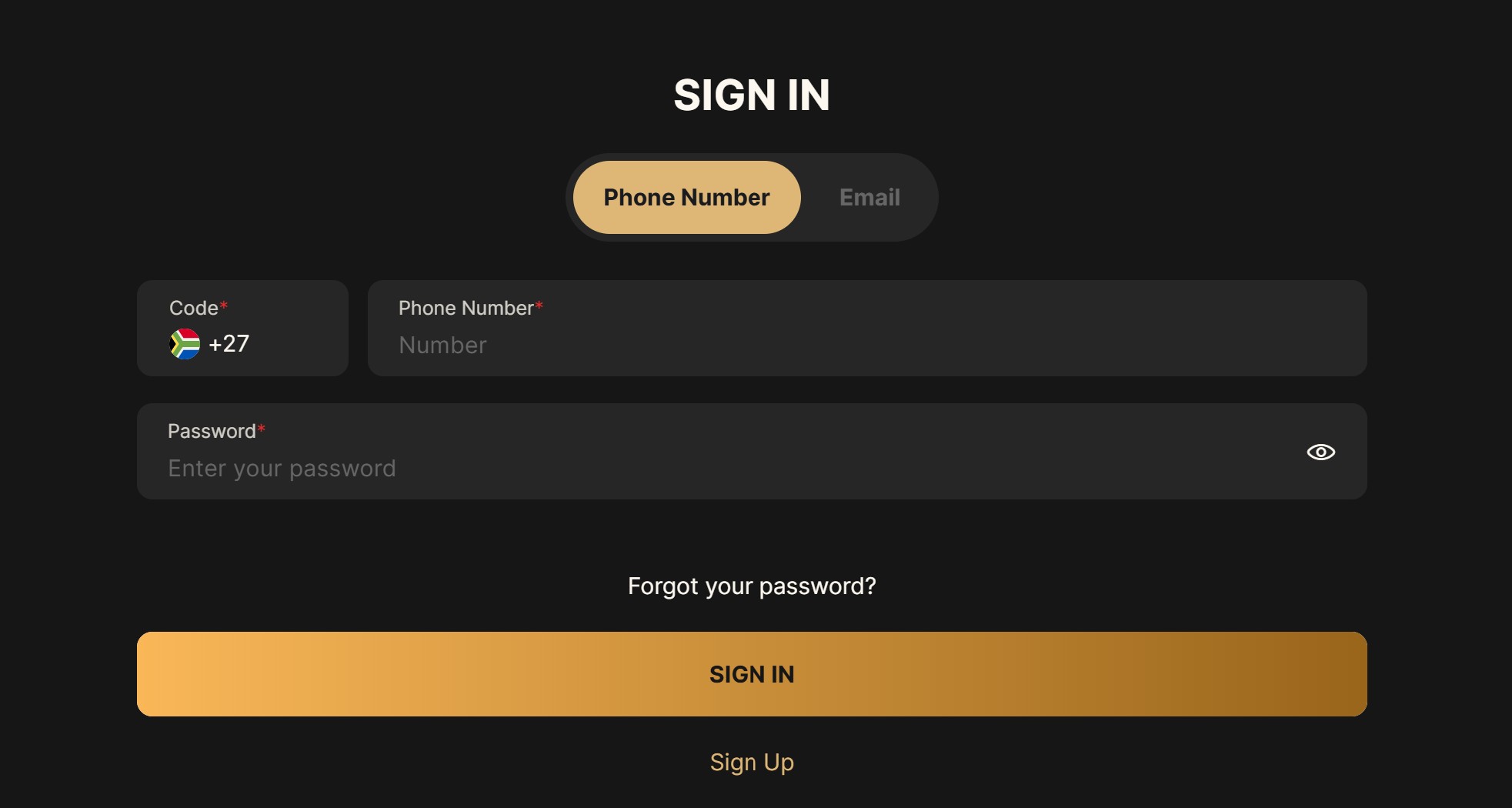
To log in to Pantherbet, open the sign-in screen, choose either the Phone Number or Email tab, enter your details and password, then tap SIGN IN. Phone logins use the South African +27 code by default. If you have forgotten your password, the “Forgot your password?” link on the same screen starts the reset.
This guide walks through the sign-in step by step, both login methods, the password reset, and the common reasons a login fails. If you do not have an account yet, our Pantherbet registration guide covers sign-up first.
⚡ Quick Facts
Login Methods
Phone or Email
Country Code
+27
Password Reset
Self-Service
Access
Browser
New Players
Sign Up
Licence
WCGRB
📋 Table of Contents
🔑 How to Log In to Pantherbet, Step by Step
Logging in takes under a minute from any phone or desktop browser. The sign-in screen gives you two ways to identify yourself, and a password field with a show or hide toggle so you can check what you type.
Step 1: Open the Sign In Screen
Go to Pantherbet and tap the Sign In button. The login box opens with two tabs at the top: Phone Number and Email.
Step 2: Choose Phone Number or Email
Tap the tab that matches how you registered. Phone Number is selected by default, with the South African +27 code already set.
Step 3: Enter Your Details
On the Phone Number tab, type your mobile number after the +27 code, without the leading zero. On the Email tab, enter your registered email address.
Step 4: Enter Your Password and Sign In
Type your password, then tap the eye icon on the right to confirm it is correct. Tap the gold SIGN IN button to enter your account.
📱 Log In With Phone Number or Email
Pantherbet lets you sign in with either your phone number or your email, and you should use whichever you gave when you registered. Both use the same password.
📲 The Two Login Options
- Phone Number: the +27 South Africa code is preset. Enter your number without the leading zero.
- Email: switch to the Email tab and enter the address you registered with.
- Password: the same for both methods, with an eye icon to reveal what you type.
🔒 Forgot Your Pantherbet Password?
If you cannot remember your password, you do not need to contact support. The sign-in screen has a “Forgot your password?” link directly below the password field. Tap it, follow the prompts to verify your account, and set a new password. Once reset, return to the sign-in screen and log in as normal.
✅ Quick Tip
Use the same phone number or email you registered with when you reset. If the recovery message does not arrive, check that the number or address matches your account details exactly.
🛠️ Can’t Log In to Pantherbet? Common Fixes
Most failed logins come down to a mistyped detail rather than an account problem. Work through these in order before contacting support.

🛠️ Login Troubleshooting Checklist
- Wrong tab: make sure you are on the Phone Number or Email tab that matches your registration.
- Number format: use the +27 code and drop the leading zero from your mobile number.
- Password: tap the eye icon to reveal it, and check your caps lock.
- Forgotten password: use the reset link rather than guessing repeatedly.
- Page will not load: refresh, clear your browser cache, or try a different browser.
- Account restricted: if you set a self-exclusion or cooling-off period, login stays blocked until it ends. Contact support if unsure.
🆕 No Pantherbet Account Yet?
If you do not have an account, tap the Sign Up link at the bottom of the sign-in screen to register. New players who deposit from R30 get the welcome pack, with 50 free spins on Gates of Olympus and no promo code needed. Our Pantherbet registration guide walks through sign-up, the promotions and codes page covers current offers, and you will need to complete FICA verification before your first withdrawal.
❓ Frequently Asked Questions
How do I log in to Pantherbet?
Open the sign-in screen, choose the Phone Number or Email tab, enter your details and password, then tap SIGN IN. Phone logins use the +27 South Africa code by default.
What if I forgot my Pantherbet password?
Tap the “Forgot your password?” link below the password field on the sign-in screen. Verify your account using your registered phone number or email, set a new password, then log in again.
Can I log in with my email instead of my phone number?
Yes. Switch to the Email tab on the sign-in screen and enter your registered email address and password. Use whichever method you signed up with.
Why can’t I log in to my Pantherbet account?
The usual causes are the wrong login tab, a mistyped number or password, or a leading zero on the phone number. Use the eye icon to check your password, the reset link if needed, and try a different browser if the page will not load.
Is HiPanther login the same as Pantherbet login?
If you are searching for HiPanther login, use the Pantherbet sign-in screen with your registered phone number or email and your password. The sign-in steps are the same as those above.
Is there a Pantherbet app to log in with?
There is no native app. You log in through the mobile browser, and you can add the site to your home screen for app-like access. See our Pantherbet mobile guide.
Ready to Sign In?
✅ Phone or Email Login | ✅ Self-Service Password Reset | ✅ WCGRB Licensed
📚 Related Resources
- Pantherbet Casino Review – Our full verdict on games, bonuses and payouts
- Pantherbet Registration Guide – Create an account and claim the welcome spins
- Pantherbet FICA Guide – Verify your account before withdrawing
- Pantherbet Withdrawal Guide – Cash out once you are logged in
- Pantherbet Mobile Guide – Add the site to your home screen
18+ Only. Pantherbet is licensed by the Western Cape Gambling and Racing Board (Licence #10194613-001). Gambling can be addictive and harmful if not controlled. Winners know when to stop. For help, contact South African Responsible Gambling Foundation: 0800 006 008 or WhatsApp 076 675 0710.
Disclaimer: This guide was last updated July 2026. Casino features and login options may change. Always verify current details on the official Pantherbet website. Gambling involves risk.
Affiliate Disclosure: iBets.co.za may receive commission through affiliate links, but this does not influence our independent reviews and analysis.
Licensing: Pantherbet is operated by Ubuntu Quantum (Pty) Ltd. Licensed by the Western Cape Gambling and Racing Board. 18+. Winners know when to stop.