
📱 App Guide

Playabets App Download Guide 2026
Android APK Download | Mobile Web for iOS | Sports, Slots and Live Casino
Free download. No Play Store needed. Bet on 1,000+ games from your phone.
⚡ Quick Facts
Android App
APK Download
iOS App
Coming Soon
Mobile Web
All Devices
Price
Free
Welcome Bonus
R3,000 + 50 FS
Games Available
1,000+
📋 Table of Contents
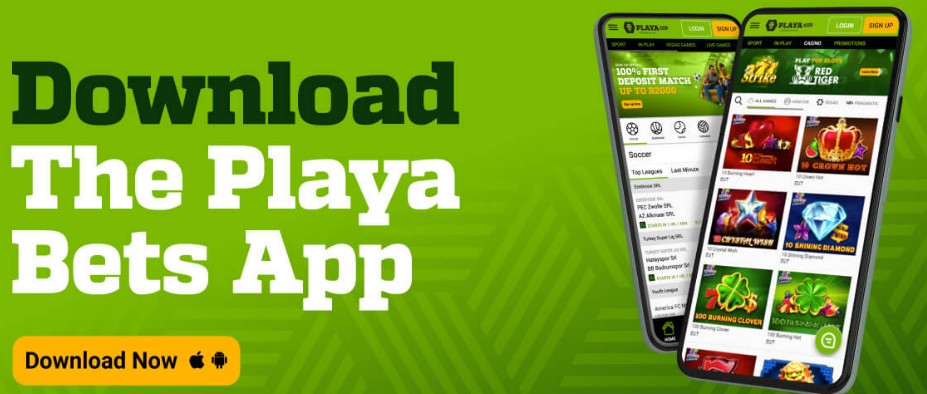
The Playabets app is available as a free Android APK download directly from the Playa Bets website. There is no Google Play Store listing, so you download the APK file and install it manually. The process takes under 2 minutes if you follow the steps below. The app gives you access to sports betting, live in-play, vegas games, slots, live casino, lucky numbers, and crash games like Aviator. Your account, balance, and bonuses sync across the app and desktop site automatically.
For iPhone users, Playabets does not currently have a native iOS app (listed as “Coming Soon” on the official download page, checked March 2026). The good news is that the Playa Bets mobile website is fully responsive and functions almost identically to the app. You can add it to your home screen as a web app shortcut for a near-native experience. This guide covers both options, plus troubleshooting for common APK installation problems. For a full overview of the platform including bonuses, payments, and FICA verification, see our Playabets Casino Review.
📱 How to Download the Playabets Android App (APK)
The Playabets app is not available on the Google Play Store because Google restricts real-money gambling apps in most regions. Instead, you download the APK file directly from playabets.co.za. This is the same installation method used by other licensed SA bookmakers like Betshezi and YesPlay. Here is the step-by-step process based on the official Playabets download page:
Step 1: Open the Playabets Download Page
Visit playabets.co.za on your Android phone’s browser (Chrome, Samsung Internet, or any mobile browser). Navigate to the app download page by scrolling to the footer and tapping “Download Our App”, or go directly to playabets.co.za/pages/DownloadApp.
Step 2: Download the APK File
Tap the “Download Android App” button on the page. The APK file will begin downloading. You may see a browser warning that says “This type of file can harm your device.” This is a standard Android warning for any APK file downloaded outside the Play Store. Tap “Download anyway” to continue. The file is safe as it comes directly from the licensed Playabets website.
Step 3: Enable “Install Unknown Apps” in Android Settings
Android 8.0 and later: Go to Settings > Apps & Notifications > Advanced > Special App Access > Install Unknown Apps. Select your browser (e.g. Chrome) and toggle “Allow from this source” to ON.
Android 7.0 and earlier: Go to Settings > Security and enable “Unknown Sources” to allow installs from outside the Play Store. You can disable this again after installation if preferred.
Step 4: Install and Open the App
Open your Downloads folder (or tap the download notification) and tap the APK file. Android will ask you to confirm the installation. Tap “Install” and wait a few seconds. Once complete, tap “Open” to launch the Playabets app. Log in with your existing account or register a new one to claim the Playabets welcome bonus of up to R3,000 + 50 free spins.
✅ Safe Download Confirmed
The Playabets APK is downloaded directly from playabets.co.za, operated by Playabets MP (Pty) Ltd and licensed by the Mpumalanga Economic Regulator (licence #9-2-1-09689). Only download from the official website. Never install APK files from third-party sites or links shared via WhatsApp or social media.
🍎 Playabets iOS App: Current Status
As of March 2026, Playabets does not have a native iPhone or iPad app. The official download page lists iOS as “Coming Soon” with no confirmed release date. Apple’s App Store has stricter requirements for gambling apps, which is why many South African bookmakers launch on Android first.
If you are on an iPhone, the best option is the Playa Bets mobile website, which you can save to your home screen as a web app. This gives you an app-like icon and full-screen experience without needing a native download. See the mobile web section below for instructions.
🌐 Mobile Web Alternative (iPhone and Android)
The Playabets mobile website works on any smartphone browser and offers the same features as the Android app: sports betting, live in-play, vegas games, live casino, deposits, withdrawals, and bonus management. The site is fully responsive and loads quickly on mobile connections. For iPhone users, this is currently the only way to access Playa Bets on mobile.
📱 How to Add Playabets to Your Home Screen
🍎 iPhone (Safari)
- Open Safari and go to playabets.co.za
- Tap the Share button (square with arrow) at the bottom of Safari
- Scroll down and tap “Add to Home Screen”
- Name it “Playabets” and tap “Add”
- The Playabets icon now appears on your home screen and opens in full-screen mode
🤖 Android (Chrome)
- Open Chrome and go to playabets.co.za
- Tap the three-dot menu (top right corner)
- Tap “Add to Home screen” or “Install app” (wording varies by device)
- Confirm by tapping “Add”
- The Playabets shortcut appears on your home screen like a regular app
Note: If you have an Android device, we recommend installing the native APK app instead, as it provides push notifications and a smoother experience than the web shortcut.
🎰 What You Can Do on the Playabets App
The Playabets mobile app provides full access to the same features available on the desktop website. Based on our testing and the information from the official Playa Bets platform, the app supports the following:

⚽ Sports Betting
- Pre-match betting: Full sportsbook covering football, rugby, cricket, tennis, basketball, horse racing, and 20+ other sports
- Live in-play: Real-time betting with live odds updates on active matches
- MultiBet builder: Build accumulator bets with automatic win boost (up to 125%)
- Bet Insurance: Up to 100x stake back if one leg loses on your multi
- Lucky Numbers: Bet on international lottery draws
🎰 Casino and Games
- Vegas Games (Slots): 1,000+ titles from Pragmatic Play, NetEnt, Red Tiger, Nolimit City, and YGGDrasil
- Live Casino: Real-time dealer games from Evolution Gaming, including roulette, blackjack, and baccarat
- Crash Games: Aviator, Spaceman, Big Bass Crash, Skyward, and X-Ride
- Keno and Spin & Win: Instant-win number games
💰 Account Management
- Deposits: Instant EFT, Visa, Mastercard, and voucher systems
- Withdrawals: Request payouts directly from the app (24-hour processing)
- FICA Upload: Submit your ID and proof of address documents through the app
- Bonus management: View active bonuses, claim promotions, and track wagering progress
- Bet history: Review all past bets, results, and transaction records
⚖️ App vs Mobile Web: Which is Better?
Both the Playabets app and mobile website give you access to the full platform. The differences come down to convenience features rather than functionality. Here is how they compare based on our testing:
| Feature | Android App | Mobile Web |
|---|---|---|
| Sports betting | ✅ Full access | ✅ Full access |
| Slots and casino | ✅ Full access | ✅ Full access |
| Deposits and withdrawals | ✅ Full access | ✅ Full access |
| Push notifications | ✅ Yes | ❌ No |
| Home screen icon | ✅ Automatic | ⚠️ Manual shortcut |
| iPhone support | ❌ Not available | ✅ Works on Safari |
| Storage required | APK file size | ✅ None (browser-based) |
| Auto-updates | ⚠️ Manual re-download | ✅ Always latest version |
| FICA upload | ✅ In-app | ✅ Via browser |
Our recommendation: If you have an Android phone, install the native APK for push notifications and a dedicated app icon. If you are on iPhone, the mobile web experience is functionally identical for betting and casino. The only thing you miss out on is push notifications for promotions and live bet updates. For a deeper look at what games and features are available, check the full Playabets review.
🔧 Troubleshooting Common Install Issues
If you run into problems downloading or installing the Playabets APK, here are the most common issues and how to fix them:
“App not installed” error
This usually means you have an older version of the Playabets app already on your device. Uninstall the existing app first (Settings > Apps > Playabets > Uninstall), then re-download and install the latest APK from the website. Your account data is stored on Playabets servers, so you will not lose anything by uninstalling.
“Install blocked” or “Installation not allowed”
You have not enabled “Install Unknown Apps” for your browser. On Android 8+, go to Settings > Apps & Notifications > Advanced > Special App Access > Install Unknown Apps, find your browser (Chrome, Samsung Internet, etc.) and toggle it ON. On older Android versions, enable “Unknown Sources” under Settings > Security.
“This type of file can harm your device”
This is a standard Chrome warning for all APK downloads, not specific to Playabets. As long as you are downloading directly from playabets.co.za, the file is safe. Tap “Download anyway” to proceed. If you see this warning on a third-party site, do not proceed. Only download from the official Playa Bets website.
App crashes or won’t load after install
Clear the app cache by going to Settings > Apps > Playabets > Storage > Clear Cache. If the problem persists, uninstall and re-download the latest APK. Make sure your Android version is up to date. If you continue experiencing issues, contact Playabets support via WhatsApp on 078 800 1018 or use the mobile website as a fallback while you troubleshoot.
Cannot find the downloaded APK file
Open your device’s Files or Downloads app and check the “Downloads” folder. The file will be named something like “playabets.apk”. If it is not there, try re-downloading from the official Playa Bets download page and check the notification bar for the download progress.
✅ Playabets App Pros and Cons
✅ What We Like
- Free download directly from the official Playabets website, no registration walls or fees
- Full access to sports, live in-play, slots, live casino, crash games, and lucky numbers
- Deposit, withdraw, and upload FICA documents directly from the app
- Push notifications for promotions, live bet updates, and cashback credits
- Same bonuses available as on desktop, including the R3,000 welcome offer and 50 free spins
- Mobile web alternative works well on all devices, including iPhone
⚠️ What Could Be Better
- No iOS app: iPhone users are limited to the mobile website (iOS listed as “Coming Soon” since at least early 2025)
- Not on Google Play Store: Requires manual APK installation, which can be confusing for less tech-savvy users
- Manual updates: The app does not auto-update. You need to re-download the latest APK from the website when updates are released
- Android security setting required: You must enable “Install Unknown Apps” before installing, which adds an extra step
❓ Frequently Asked Questions
Is the Playabets app available on iPhone?
Not yet. The Playabets iOS app is listed as “Coming Soon” on the official download page (checked March 2026). iPhone users can access the full Playa Bets platform through the mobile website at playabets.co.za. You can add a home screen shortcut through Safari for an app-like experience.
Is the Playabets APK download safe?
Yes, provided you download directly from the official Playabets website (playabets.co.za/pages/DownloadApp). The app is published by Playabets MP (Pty) Ltd, licensed by the Mpumalanga Economic Regulator. Do not download from third-party APK sites, WhatsApp links, or social media posts. The “file may harm your device” warning is a standard Android message for any APK downloaded outside the Play Store.
Why is Playa Bets not on the Google Play Store?
Google restricts real-money gambling apps on the Play Store in most countries, including South Africa. This is a Google policy issue, not a Playabets issue. All major SA bookmakers distribute their Android apps as direct APK downloads. YesPlay, Betshezi, Easybet, and Gbets all use the same distribution method.
Can I claim the Playabets welcome bonus on the app?
Yes. All bonuses and promotions are available on both the app and mobile website. New players can claim up to R3,000 + 50 free spins on Gates of Olympus by registering and depositing through the app. For full bonus details and our wagering analysis, see the Playabets Bonus Guide.
How do I update the Playabets app?
Since the app is not on the Play Store, it does not auto-update. To update, visit the Playabets download page and download the latest APK. Install it over the existing app. Your account, balance, and bet history are stored on Playabets servers, so updating does not affect your data.
Can I deposit and withdraw money on the Playa Bets app?
Yes. The app supports all the same payment methods as the desktop site: instant EFT, Visa, Mastercard, and voucher deposits. Withdrawals can be requested directly from the app and are processed within 24 hours. You will need to complete FICA verification before your first withdrawal.
Ready to Bet on the Go?
✅ Free Android APK | ✅ 1,000+ Games | ✅ R3,000 Welcome Bonus | ✅ 50 Wager-Free Spins
📚 Related Resources
- Playabets Casino Review 2026 – Full platform guide covering games, payments, and FICA
- Playabets Bonus Guide – Welcome offers, free spins, cashback, and wagering breakdown
- Playabets Registration Guide – Step-by-step sign up with bonus selection
- Playabets Login Guide – Sign in on desktop, mobile, and the Android app
- Playabets Company Profile – Licensing, address, and corporate background
18+ Only. Playabets is licensed by the Mpumalanga Economic Regulator, KwaZulu-Natal Gaming and Betting Board, and Western Cape Gambling Board. Gambling can be addictive and harmful if not controlled. Winners know when to stop. For help, contact South African Responsible Gambling Foundation: 0800 006 008 or WhatsApp 076 675 0710.
Disclaimer: This guide was last updated March 2026. App features and availability may change. Always download from the official Playabets website. Gambling involves risk.
Affiliate Disclosure: iBets.co.za may receive commission through affiliate links, but this does not influence our independent reviews and analysis.
Licensing: Playabets MP (Pty) Ltd. Licensed by the Mpumalanga Economic Regulator (licence #9-2-1-09689). 18+. Winners know when to stop.